Higgsfield, the AI media platform built around cinematic video generation, has connected its full model library directly to ChatGPT. Anyone using ChatGPT can now generate images and videos inside the chat window itself, without opening a separate app, without switching tabs, and without exporting files back and forth between platforms.
The move comes through the Model Context Protocol, or MCP, an open standard that lets AI chat systems tap into external tools without needing custom integrations built for each one. In practical terms, ChatGPT becomes the interface, and Higgsfield’s model stack does the actual generation work behind the scenes.
What Changed
Before this integration, creating a polished AI video or image usually meant working across two or three separate tools. A user might brainstorm ideas in ChatGPT, then move to a dedicated image or video platform to actually produce the visual, then bounce back to ChatGPT to refine the concept again. Every switch added friction and broke the creative flow.
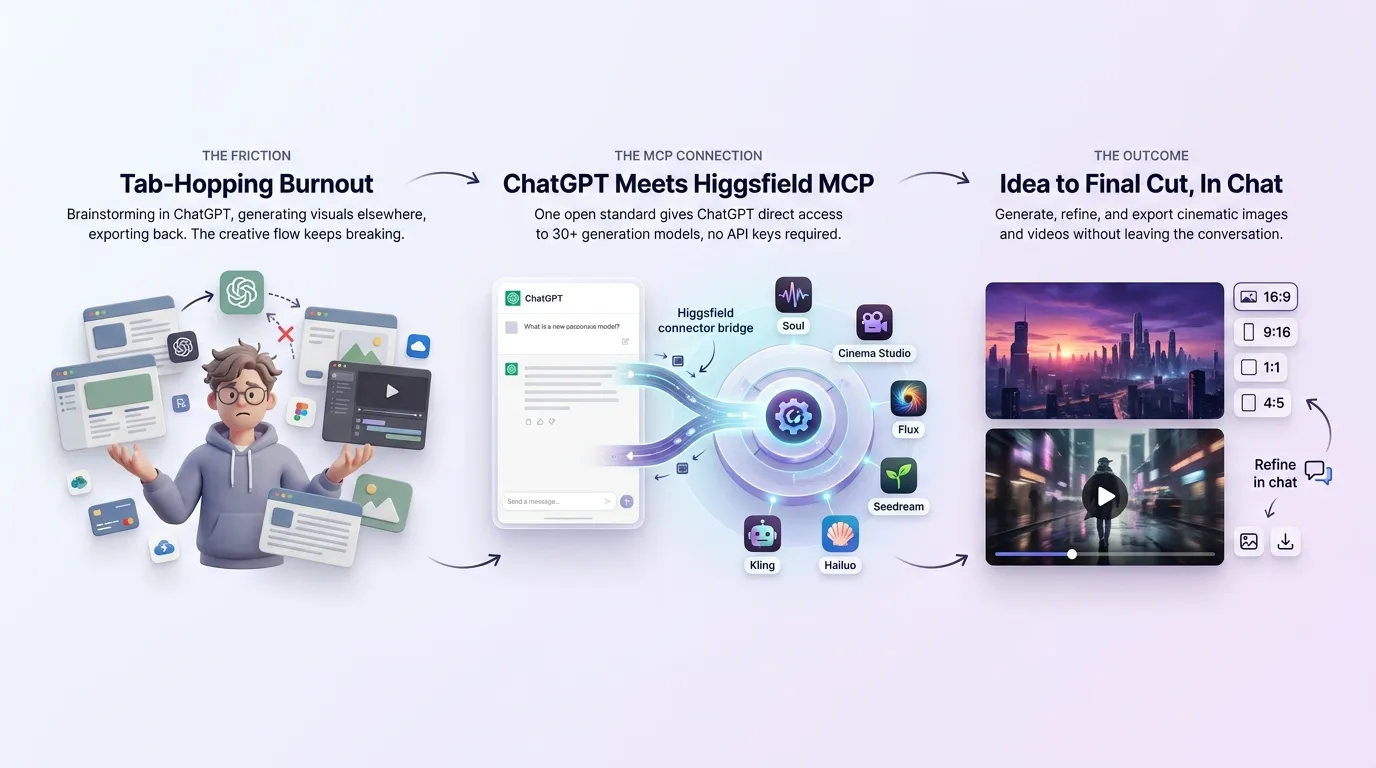
The new connection removes that gap. A prompt typed inside ChatGPT can now trigger an image or video generation directly, with the result appearing right in the conversation. Users can describe what they want, wait for the output, and then keep talking to refine it, all without leaving the chat.
Higgsfield gives ChatGPT access to more than 30 models, including Soul for consistent character generation, Cinema Studio for cinematic footage, Flux and Seedream for image work, and Kling and Minimax Hailuo for video. The system picks the best model for a given request automatically, though users who know what they want can name a specific model instead.
Setting Up the Connection
Getting started takes only a few minutes. The steps below walk through the full process.
Step 1: Add the Higgsfield connector.
Inside ChatGPT, open the tools or connectors section and add the Higgsfield MCP server. This links the two platforms without requiring any code or API key setup on the user’s end.
Step 2: Sign in with an existing account.
Users authenticate through their Higgsfield login. Anyone without an account can create one directly during this step. Free accounts come with limited daily credits, while paid plans unlock higher resolution, longer videos, and watermark-free exports.
Step 3: Confirm the connection is active.
Once signed in, the connector stays linked for future sessions. Credits from an existing Higgsfield plan carry over automatically, so there is no separate billing to manage inside ChatGPT.
Step 4: Write a prompt.
From here, generation works like any other ChatGPT request. Users type what they want, whether that is a product photo, a short cinematic clip, or a UGC-style video for social media. Mentioning the intended platform, such as Instagram Reels or YouTube Shorts, helps the system pick the right aspect ratio and pacing.
Step 5: Let the system choose a model.
ChatGPT routes the request to whichever Higgsfield model fits best. A request for a talking avatar might go to Soul, while a cinematic product shot might route to Cinema Studio or Kling. Users are not required to understand the model lineup themselves, though the option to specify one remains available for anyone who wants more control.
Step 6: Wait for the output.
Image generation typically completes in a few seconds. Video takes longer, since rendering runs asynchronously in the background while the model processes motion, timing, and detail. ChatGPT displays the result as soon as it is ready.
Step 7: Refine directly in the chat.
This is where the integration saves the most time. Instead of exporting a file to make a small change, users can simply ask for adjustments, a different background, a color swap, a new camera angle, and the system regenerates accordingly.
Step 8: Export in the right format.
Once satisfied, users can request the final file in whichever aspect ratio suits their platform, including 16:9 for YouTube, 9:16 for Reels and TikTok, or 1:1 and 4:5 for standard social posts.
Step 9: Reuse past generations.
Higgsfield keeps a history of everything created through the connection. Past images or videos can be pulled back up and used as a starting point for new work, which is useful for teams producing multiple variations of the same campaign.
A recent walkthrough covering the full setup process breaks this down visually, showing each step from connection to first generated video:
GENERATE VIDEOS in ChatGPT with Higgsfield MCP
🔗 https://www.youtube.com/watch?v=H96P7yyM2cQ
Part of a Larger Pattern
This is not an isolated move. Higgsfield already runs a similar MCP-based connection for Claude, giving that platform access to the same model library for generating images up to 4K resolution and video clips up to 15 seconds across formats.
The company has also worked closely with OpenAI on the modeling side, using GPT-4.1 and GPT-5 to translate loose creative direction, phrases like “make it feel premium” or “give it a dramatic hook”, into structured technical instructions that video models such as Sora 2 can actually execute.
According to OpenAI, that combination now powers roughly 4 million video generations a day across Higgsfield’s platform.
The pattern points to a broader shift in how AI creative tools are being built. Rather than positioning itself as a standalone destination, Higgsfield is embedding its generation capabilities into whichever chat interface people already use, whether that is ChatGPT, Claude, or other MCP-compatible agents.
What to Watch For
The setup is genuinely simple, but a few honest caveats are worth knowing before relying on it for serious work. Video generation still takes noticeably longer than images, so batch projects with tight deadlines may need planning around wait times.
Free-tier credits are limited, meaning heavier users will likely need a paid plan to avoid running out mid-project. And while the system automatically selects models, results can vary depending on how specific or vague a prompt is, so clearer direction tends to produce more usable output on the first try.
For creators and marketers who used to juggle multiple tabs and tools to go from idea to finished visual, the ChatGPT integration cuts that process down to a single conversation. Whether it becomes a daily habit or a nice-to-have shortcut will likely come down to how consistently the output holds up once more users start putting it to work.
Quick Links: