
Small Caps Text Generator

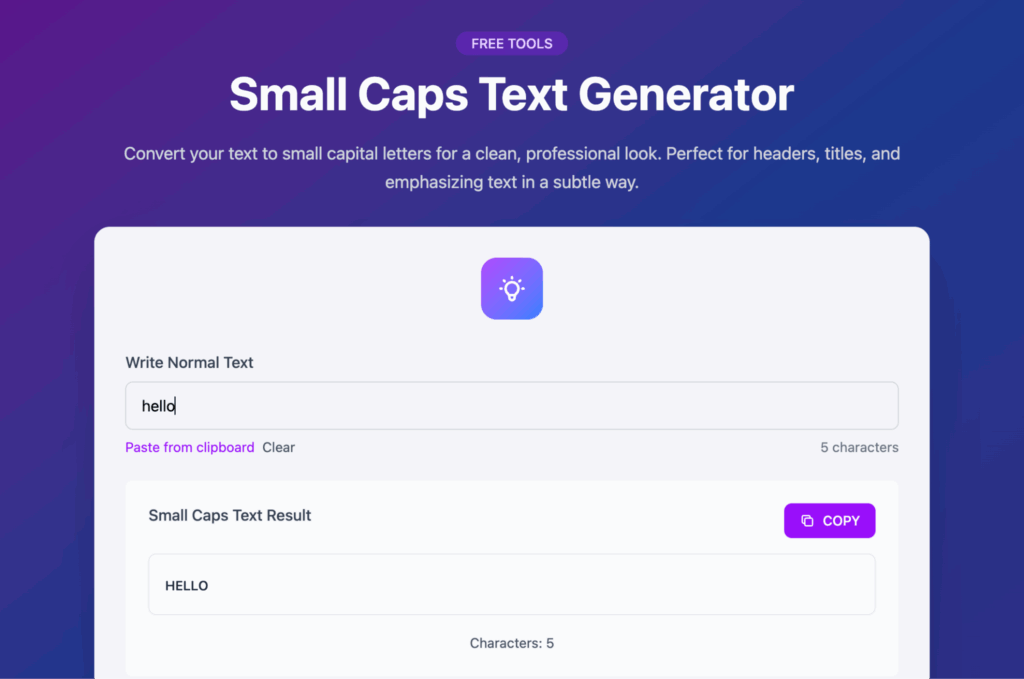
Convert your text to small capital letters for a clean, professional look. Perfect for headers, titles, and emphasizing text in a subtle way.

✨ What Is This Tool?

The Free AI Small Caps Text Generator by Affiliate Booster is a creative, AI-powered tool that converts ordinary text into stylish small capital letters. Perfect for adding a professional and elegant touch to headers, titles, social media posts, and branding materials, this tool helps your text stand out with a clean, uniform look. Small caps are uppercase letters designed in a smaller size than regular capitals, lending a subtle emphasis without overwhelming the design.

✨ Why We Created This Tool

Affiliate Booster understands that styling text is crucial for grabbing attention and creating visually appealing content. However, manually formatting small caps can be tricky and time-consuming, especially on platforms that don’t support this style easily. Our Free AI Small Caps Text Generator streamlines this process by instantly converting your input into polished small caps letters, saving you time and effort while enhancing your content’s professionalism and aesthetic appeal.

✨ How It Works

✔️ Step 1:

  • Simply enter or paste your normal text into the input box
  • Click “Generate Small Caps”
  • Receive your text transformed into small capital letters instantly
  • Copy the generated text and use it anywhere—social posts, documents, websites, or marketing materials
  • Unlimited uses without sign-up or fees

What Makes It Different?

Professional and Clean Design

Generates small caps text that balances readability with elegant styling.

Quick and Easy to Use

No technical skills required—just input and convert in seconds.

Versatile and Universal

Works across popular social media, blogs, emails, and documents, supporting your online presence and branding.

Free and Unlimited

Enjoy unlimited conversions at no cost, powered by Affiliate Booster’s creator-first approach.

Who Is This Tool For?

  • Content creators and marketers enhancing headlines and posts
  • Designers and brand builders adding style to text
  • Writers and students who want elegant formatting
  • Social media managers looking to differentiate content

Why Small Caps Matter

Small caps help create subtle emphasis and a sophisticated look without the harshness of all-uppercase text. The Free AI Small Caps Text Generator by Affiliate Booster makes it effortless to style text professionally and attractively.

🤍 Ready to Elevate Your Text Style?

Enter your text and convert it instantly with Affiliate Booster’s Free AI Small Caps Text Generator—fast, free, and beautifully simple!

  • Free
  • No sign-up
  • Runs in your browser
  • Updated November 12, 2026

How to use the Small Caps Generator

  1. Type or paste your text.
  2. Choose all small caps, or small caps with a big first letter on each word.
  3. Copy and paste it into your profile, post or design.

What happens to your text

Your text never leaves your device. This tool runs entirely in your browser with JavaScript, so nothing you type is uploaded, saved or shared with anyone.

Refresh or close the page and it is gone.

FAQ

Small Caps Generator FAQs

What are small caps?

Small caps are capital letters drawn at about the height of lowercase letters, like ꜱᴍᴀʟʟ ᴄᴀᴘꜱ. Designers use them for headings, acronyms and an elegant, quiet look. This tool uses small capital characters from Unicode's phonetic blocks, so the result is text you can paste into apps that have no small caps setting.

Why do q and x look different from the other letters?

Unicode has no small capital X, and the small capital Q is new and missing from many fonts. Like most generators, this tool uses ǫ for q and keeps a normal lowercase x so the text displays everywhere. If those letters bother you, choose words without them for names or headings.

What does "first letter big" do?

It keeps the first letter of every word as a normal capital and turns the rest into small caps, which mimics the classic typographic style used for names and titles. For example, "jitendra vaswani" becomes Jɪᴛᴇɴᴅʀᴀ Vᴀꜱᴡᴀɴɪ. The plain small caps style converts every letter, including the first.

Can I use small caps in Instagram, TikTok or Discord names?

Yes. Small caps characters are widely supported, so they are a popular way to style bios and display names. Some platforms limit special characters in usernames or handles, so use them in display names and bios rather than the @handle. Keep your real name searchable somewhere in plain text.

Is Unicode small caps the same as small caps in Word or CSS?

No. In Word, Google Docs or CSS, small caps is a font setting that changes how normal letters are drawn, so the text stays searchable and accessible. This tool replaces letters with different Unicode characters. Use the font setting when you are writing a document or website, and this tool for apps with no formatting.

Jitendra Vaswani

Built by Jitendra Vaswani. AI SEO and digital marketing consultant, founder of Digiexe and AffiliateBooster, best-selling author and international speaker. More about Jitendra

Last updated:

Scroll to Top