
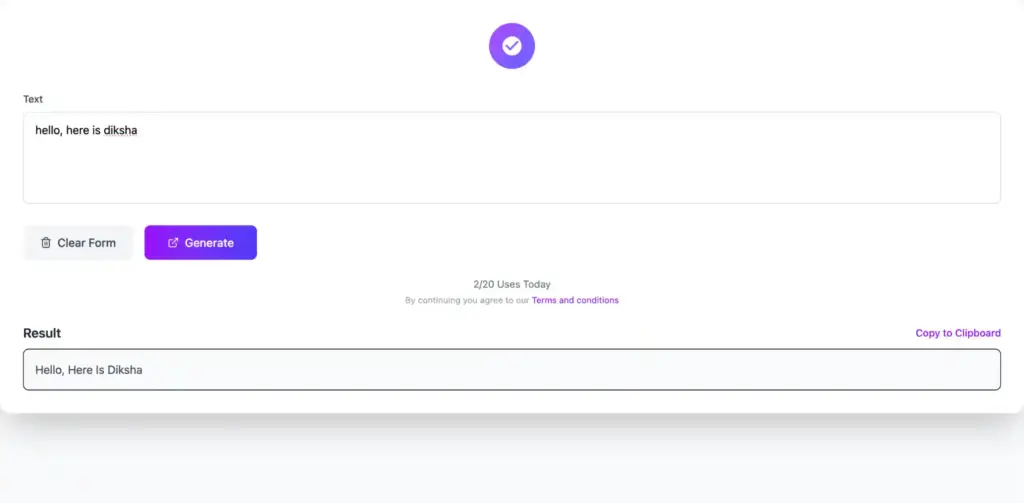

Free AI Capitalize Tool

🌍 In the world of written communication, details matter. Among the most fundamental yet often overlooked aspects is capitalization. Proper capitalization is the foundation of professional writing; it guides the reader, adds authority to your words, and reflects precision. On the other hand, incorrect capitalization can quickly damage credibility, making content appear unprofessional and harder to read. From the first letter of a sentence to the rules of title case and the handling of acronyms, getting it right every time can be both tedious and error-prone.

That is why we created the Free AI Capitalize Tool 🤖—a simple yet powerful solution designed to make professional writing accessible to everyone. Whether you are a student striving for a perfect grade, a business professional preparing an important email, or a content creator polishing your next masterpiece, this tool ensures excellence is effortless. More than just a text converter, it acts as your dedicated proofreader, ensuring your writing makes the strong first impression it deserves 🌟.

Why a Smart AI Capitalization Tool is an Essential Part of Your Workflow 💖

You might think, "I can just use the Shift key." But intelligent capitalization goes far beyond that. Our AI-powered tool offers a level of accuracy and efficiency that manual methods simply cannot match.

Unwavering Professionalism

Your writing is a reflection of you. Correct capitalization in emails, reports, and social media posts instantly elevates your message, conveying competence and attention to detail.

Enhanced Clarity and Readability

 Capitalization acts as a visual signpost for your readers. It separates sentences, highlights proper nouns, and structures titles, making your text flow smoothly and logically. This reduces reader fatigue and improves comprehension.

Massive Time Savings

Manually proofreading a long document for capitalization errors is a time-consuming chore. Our tool analyzes and corrects your entire text in a single click, freeing you to focus on the substance of your message.

Flawless Accuracy

 It’s easy for the human eye to miss a lowercase “i” or an incorrectly capitalized word in a headline. Our AI is trained on a vast dataset of grammatical and stylistic rules, ensuring a level of accuracy that is nearly impossible to achieve manually.

Guaranteed Consistency

 In branding and formal writing, consistency is key. Our tool ensures that brand names, titles, and specific terms are capitalized the same way every single time across your entire document.

✨ A Deep Dive into the Features: More Than Just a Case Converter ✨

Our Free AI Capitalize Tool is equipped with a suite of powerful modes, each designed for a specific purpose. Let’s explore each one in exhaustive detail.

1. Sentence Case

This is the standard for most writing. Sentence case automatically capitalizes the first letter of the first word in every sentence. It intelligently identifies sentence-ending punctuation (periods, question marks, exclamation points) to know where a new sentence begins.

  • How it Works: It scans your text for sentence terminators and ensures the subsequent word begins with a capital letter.
  • Best For: Paragraphs, body text in articles, emails, reports, and almost any form of standard writing.
  • Example: this is a test. our ai tool is very smart. becomes This is a test. Our ai tool is very smart.

2. Title Case (also known as Headline Case)

This is one of the most complex capitalization styles, and where our AI truly shines. Title case involves capitalizing the principal words in a title or headline. Humans often struggle with this, forgetting which “small words” (like ‘a’, ‘an’, ‘the’, ‘and’, ‘but’, ‘or’, ‘for’, ‘nor’, ‘on’, ‘at’, ‘to’, ‘from’, ‘by’) should remain lowercase.

  • How it Works: Our AI is programmed with style guide rules (like AP, Chicago, and MLA) to identify major words (nouns, verbs, adjectives, adverbs) and minor words (articles, short prepositions, coordinating conjunctions). It automatically capitalizes the major words while keeping the minor ones lowercase, except when they are the first or last word of the title.
  • Best For: Blog post titles, article headlines, book titles, email subject lines, and chapter headings.
  • Example: a deep dive into the features of our new tool becomes A Deep Dive Into the Features of Our New Tool.

3. UPPERCASE

This mode converts every letter in your text to its uppercase form.

  • How it Works: It’s a straightforward conversion of every character to its capital equivalent.
  • Best For: Creating acronyms (e.g., national aeronautics and space administration to NATIONAL AERONAUTICS AND SPACE ADMINISTRATION), adding strong emphasis to a word or phrase, or for headings in certain design styles.
  • Example: Warning: do not proceed. becomes WARNING: DO NOT PROCEED.

4. lowercase

This mode converts every letter in your text to its lowercase form.

  • How it Works: It converts all characters to their lowercase equivalents, resetting any existing capitalization.
  • Best For: Stylistic effects in creative writing or design, or for “cleaning” text to a neutral state before applying another case style.
  • Example: This Text Has Mixed CAPITALIZATION. becomes this text has mixed capitalization.

5. The "Smart AI" Advantage: Recognizing Proper Nouns

This is what separates our tool from basic converters. Our AI model can identify proper nouns—the specific names of people, places, organizations, and brands—and ensure they remain capitalized, even when applying a style like Sentence Case.

  • Example: If your input is i went to paris to visit my friend, john smith. we work at google.
    • A basic “Sentence case” script might produce: I went to paris to visit my friend, john smith. We work at google. (Incorrectly lowercasing the proper nouns).
    • Our AI Capitalize Tool produces: I went to paris to visit my friend, John Smith. We work at google. (Correctly identifying and preserving the capitalization of “Paris,” “John Smith,” and “Google”).

⭐ How We Compare to Other Methods ⭐

Feature Free AI Capitalize Tool Manual Checking Basic Word Processor (e.g., MS Word)
Speed Instantaneous. Handles thousands of words in a second. Extremely Slow. Tedious and time-consuming. Slow. Requires right-clicking or manually changing case for each selection.
Accuracy Very High. AI trained on extensive grammatical rules. Error-Prone. Human eyes easily miss mistakes. Moderate. Often makes mistakes with complex Title Case and proper nouns.
Title Case Rules Excellent. Intelligently applies style guide rules. Difficult. Requires memorizing complex rules. Poor. Typically just capitalizes the first letter of every word, which is incorrect.
Proper Noun ID Excellent. Smartly recognizes and preserves proper nouns. Reliant on user knowledge. Inconsistent. May or may not recognize all proper nouns.
Consistency Perfect. Applies the same rules across the entire text without fail. Difficult to maintain, especially in long documents. Requires manual effort to ensure consistency.
Cost Completely Free. Your valuable time. Often part of a paid software suite.

✨ Step-by-Step Guide: How to Use the Free AI Capitalize Tool

Our interface is designed for maximum simplicity and power. Here’s how to get a perfectly capitalized text in seconds.

✔️ Step 1: Input Your Text

  • Simply type or paste your text directly into the large input box on the left side of the tool. There is no character limit, so feel free to paste entire articles, essays, or reports.

✔️ Step 2: Choose Your Desired Capitalization Style

Above the input box, you will find a set of clear, clickable buttons, each representing a different capitalization mode:
  • Sentence case
  • Title Case
  • UPPERCASE
  • lowercase

✔️ Step 3: Click to Convert

  • Click the button corresponding to the style you want to apply. The moment you click, our AI will process the text and instantly display the perfectly capitalized version in the output box on the right.

✔️ Step 4: Copy Your Polished Text

  • In the top right corner of the output box, click the “Copy” icon. Your professionally capitalized text is now copied to your clipboard, ready to be pasted anywhere you need it.

✨ Who is This Tool For?

Our Free AI Capitalize Tool is a vital asset for a wide range of users:

✨ Students: Ensure your essays, research papers, and dissertations meet academic standards and make a great impression.
✨ Content Creators & Bloggers: Craft perfect, clickable headlines and ensure your articles are polished and professional from top to bottom.
✨ Business Professionals: Write clear, authoritative emails, reports, and presentations that command respect.
✨ Marketers & SEO Specialists: Optimize your ad copy, meta titles, and landing page headlines for maximum impact and readability.
✨ Authors & Editors: Speed up the editing process by automating one of the most tedious proofreading tasks.
✨ Non-Native English Speakers: A powerful learning aid to help you master the complex and often confusing capitalization rules of the English language.

🤍 Conclusion: Elevate Your Writing Instantly, for Free

✨ The Free AI Capitalize Tool is more than a simple utility—it’s your partner in effective communication. It empowers you to present your ideas with the clarity, professionalism, and authority they deserve, all with a single click. Say goodbye to tedious manual corrections and the fear of embarrassing errors.

Take control of your writing, perfect your presentation, and make every word count. Try the Free AI Capitalize Tool now and experience the difference for yourself. 🌟

  • Free
  • No sign-up
  • Runs in your browser
  • Updated November 12, 2026

How to use the Capitalization Tool

  1. Paste the text you want to convert.
  2. Tap a case: UPPERCASE, lowercase, Title Case, Sentence case, camelCase and more.
  3. Copy the result. Word and character counts update as you go.

What happens to your text

Your text never leaves your device. This tool runs entirely in your browser with JavaScript, so nothing you type is uploaded, saved or shared with anyone.

Refresh or close the page and it is gone.

FAQ

Capitalization Tool FAQs

What text cases can this tool convert to?

UPPERCASE, lowercase, Title Case, Sentence case, Capitalize Each Word, aLtErNaTiNg cAsE and iNVERSE cASE for everyday writing, plus camelCase, PascalCase, snake_case and similar formats for code and file names. Click a case and the result appears instantly, ready to copy. Word and character counts are shown as well.

What is the difference between Title Case and Capitalize Each Word?

Capitalize Each Word puts a capital on every word, including short ones like "and", "of" and "the". Title Case follows headline style, which keeps short articles, conjunctions and prepositions lowercase unless they start the title. Use Title Case for blog headlines and book titles, and Capitalize Each Word for labels or names lists.

How do I fix text typed with Caps Lock on?

Paste it in and choose Sentence case. It lowercases everything and then capitalises the first letter of each sentence. Afterwards, check proper nouns such as names, brands and places, because no automatic tool knows which words should stay capitalised. Title Case is better if the text is a heading.

Is my text sent anywhere?

No. The case conversion runs in your browser with JavaScript, so the text never leaves your device and nothing is stored. That makes it safe for drafts, code snippets or client copy you would rather not upload. Refreshing or closing the page clears the box, and there is no account or history to delete.

What are camelCase, PascalCase and snake_case used for?

They are naming styles for programming and files, where spaces are not allowed. camelCase joins words with a capital on each word after the first (myVariableName), PascalCase capitalises every word (MyClassName), and snake_case joins lowercase words with underscores (my_file_name). Which one to use depends on your language or team style guide.

Jitendra Vaswani

Built by Jitendra Vaswani. AI SEO and digital marketing consultant, founder of Digiexe and AffiliateBooster, best-selling author and international speaker. More about Jitendra

Last updated:

Scroll to Top