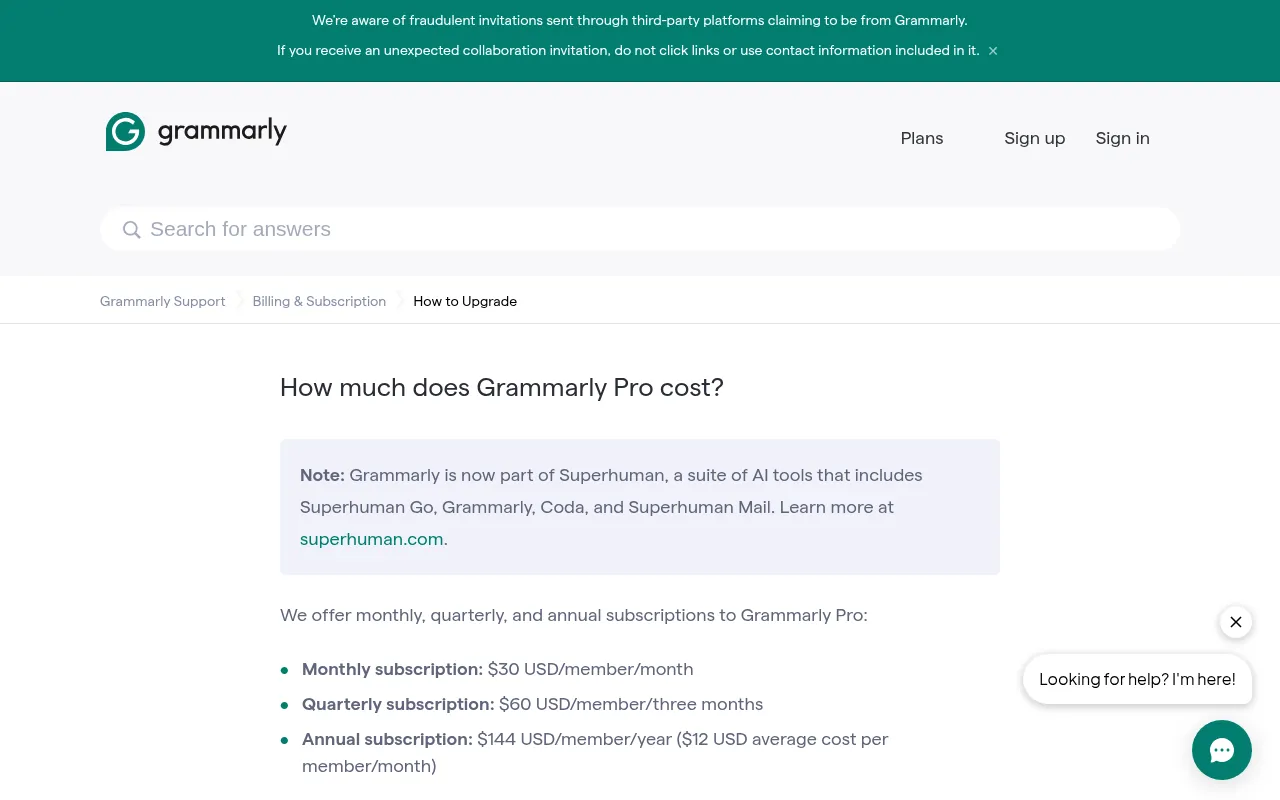
Grammarly Premium price in India, the short answer: Grammarly Premium is now called Grammarly Pro. It costs US$12 a month when you pay US$144 for a year, US$60 for three months, or US$30 for a single month. That works out to about ₹13,647 a year, ₹5,686 a quarter or ₹2,843 a month at today’s exchange rate. Grammarly says it offers regional pricing in Indian rupees at checkout, so the rupee price you see when you sign in from India can be lower than this straight conversion. The free plan costs ₹0, Pro comes with a free trial, and Enterprise is priced on request.
I write and edit content every single day, for my own sites and for clients, so a grammar checker is one tool I actually pay attention to. Grammarly is the one most people in India ask me about, and the most common question is simple: how much does it really cost here, and is the paid plan worth it?
So in this guide I break down Grammarly pricing in 2026 plan by plan. All Grammarly prices here come from Grammarly’s official plans page and its support center, checked on October 21, 2026. I convert the dollar prices to rupees for readers in India, explain the free trial, tax, refunds and payment methods, and give my honest view on which Grammarly plan makes sense. I have not invented test scores or accuracy numbers, so you will only see facts you can check and my opinion.
Grammarly Pricing at a Glance (USD and INR)
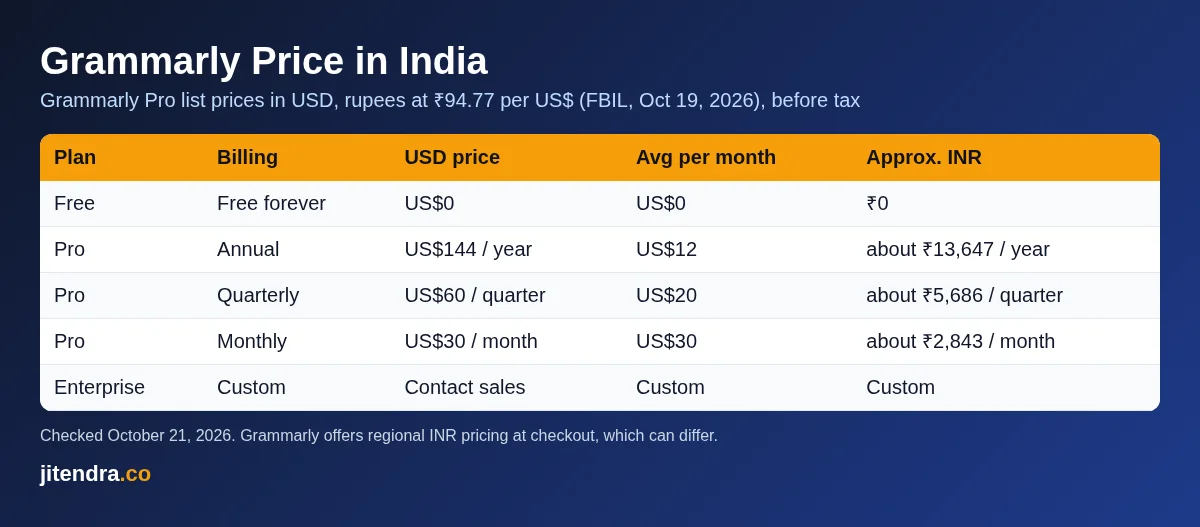
Here are all the Grammarly plans on one table. Rupee figures use the FBIL reference rate of ₹94.77 per US dollar (October 19, 2026) and are rounded. They are before any tax and before the foreign transaction fee your bank may add.
| Grammarly plan | Billing | Price in USD | Average per month | Approx. price in INR | Free trial |
|---|---|---|---|---|---|
| Free | Free forever | US$0 | US$0 | ₹0 | Not needed |
| Pro (annual) | Billed yearly | US$144 a year | US$12 | about ₹13,647 a year (₹1,137 a month) | Yes |
| Pro (quarterly) | Billed every 3 months | US$60 per quarter | US$20 | about ₹5,686 per quarter (₹1,895 a month) | Shown at checkout |
| Pro (monthly) | Billed monthly | US$30 a month | US$30 | about ₹2,843 a month | Shown at checkout |
| Enterprise | Custom contract | Contact sales | Custom | Custom | No |
Source: Grammarly plans page and the Grammarly Support article “How much does Grammarly Pro cost?”, checked October 21, 2026.
The quick takeaways:
- Cheapest paid option: Pro on the annual plan, at US$12 a month on average (about ₹1,137).
- Most expensive way to pay: monthly billing at US$30 a month. Over a year that adds up to US$360, which is two and a half times the annual price.
- Free plan: yes, forever, with basic grammar, spelling, punctuation and tone detection.
- Rupee pricing: Grammarly says it offers regional pricing in Indian rupees, shown during checkout.
- Refunds: Grammarly only issues refunds where the law requires it, so cancel a trial before it ends if you do not want to pay.
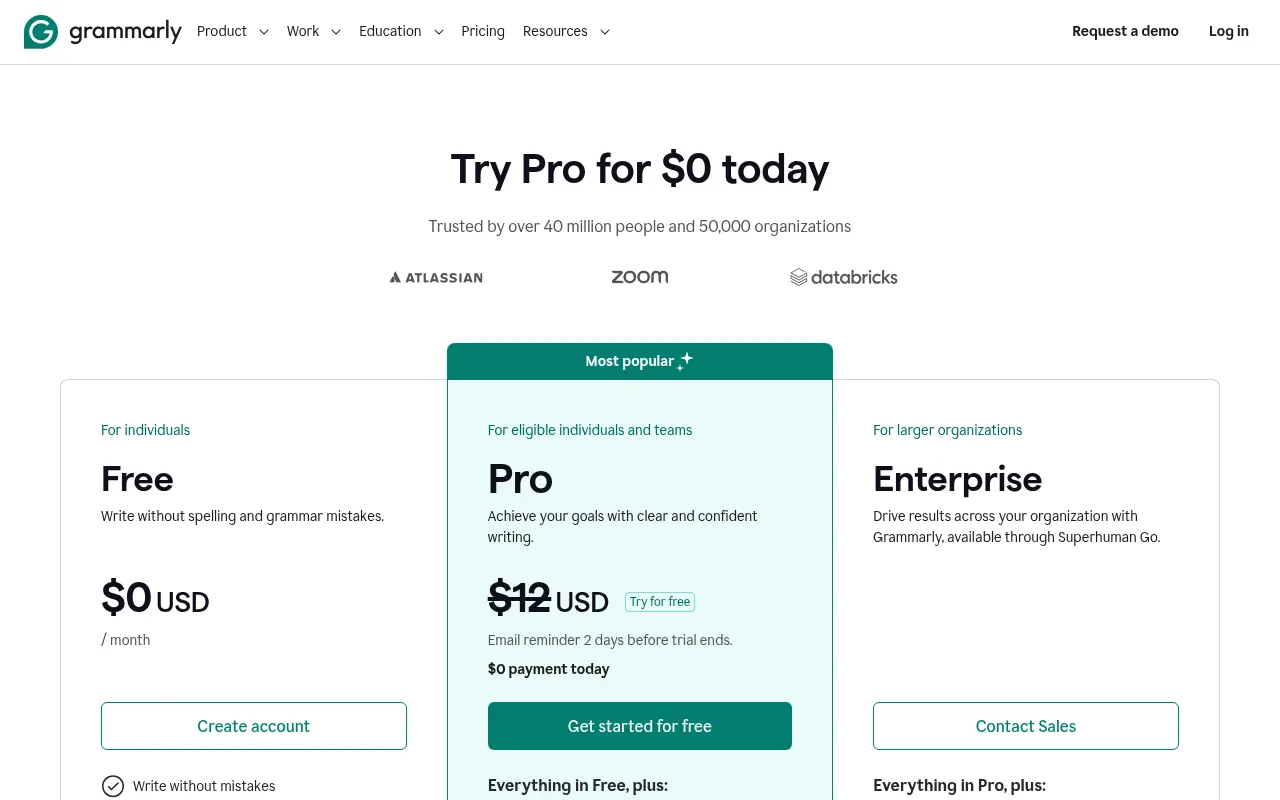
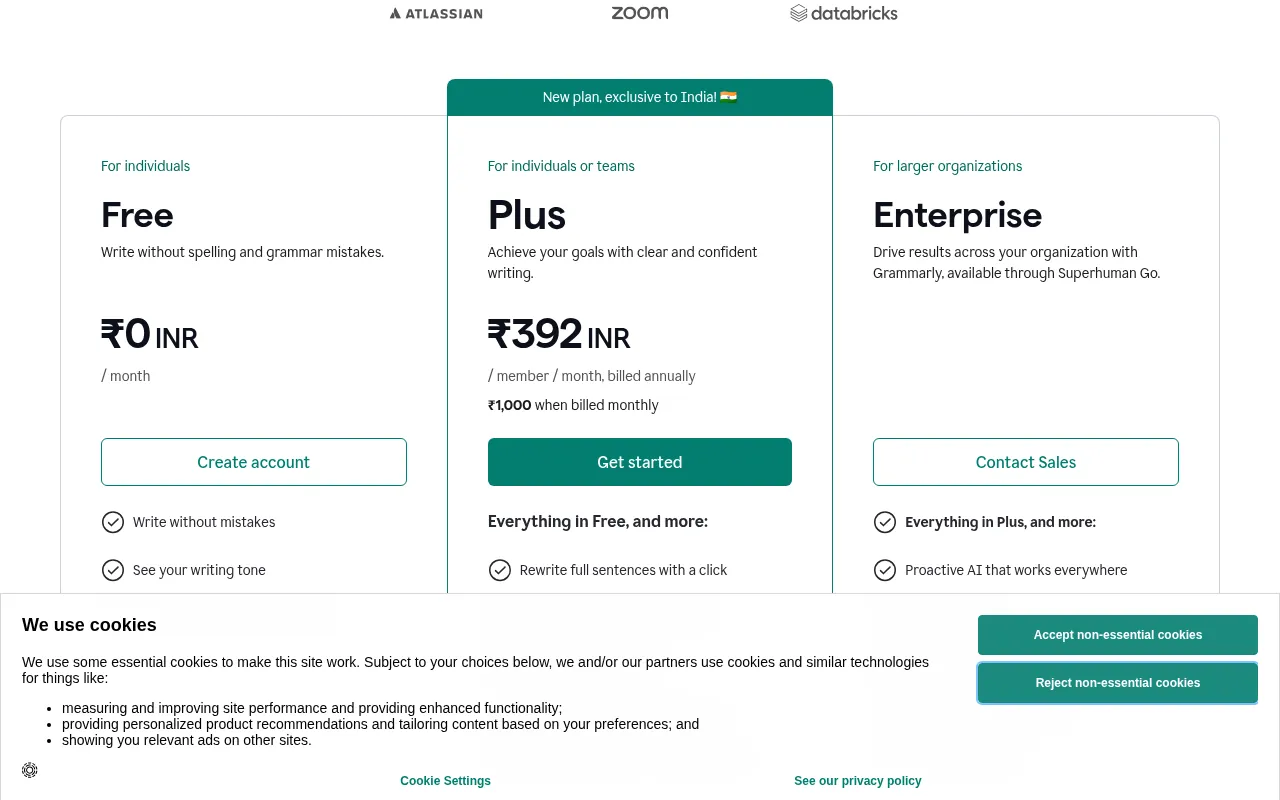
If you search for the Grammarly Premium price, you will notice the official pricing page no longer shows a plan called Premium. Grammarly replaced its old lineup (Free, Premium and Business) with three new plans: Free, Pro and Enterprise. Grammarly also became part of Superhuman, a suite of AI tools that includes Grammarly, Coda and Superhuman Mail.
Here is what that means for you:
- Grammarly Premium is now Grammarly Pro. Pro includes all the advanced writing features that Premium had, such as tone adjustments and full-sentence rewrites, plus team features that used to be limited to the Business plan.
- Grammarly Business is gone. Grammarly’s support center says Pro replaces the Business plan. Pro supports up to 149 seats.
- Old Premium subscribers can switch. Grammarly’s FAQ says that if you switch from Premium to Pro, your Premium subscription is cancelled and you get a prorated refund for the remaining time.
So when people search for the Grammarly Premium price, the Grammarly premium price India, the Grammarly India price or Grammarly pricing India, they are now talking about the same plan: Grammarly Pro. In this guide I use “Pro” for the current plan and “Premium” only when I mean the older name.
Grammarly Plans Explained
Grammarly plans are simple compared with most software. There is one free plan, one paid plan for individuals and teams, and one custom plan for large companies.
Grammarly Free plan: ₹0
The free Grammarly plan is for anyone who wants clean, mistake-free writing without paying. According to Grammarly’s plans page, it lets you:
- Write without spelling and grammar mistakes
- See your writing tone
- Generate text with 100 AI prompts a month
The free plan works in the browser extension, the desktop app, the mobile keyboard and Grammarly’s own editor. For students, bloggers and job seekers who only need a second pair of eyes on spelling and grammar, it is genuinely useful. If you just need a quick check without installing anything, you can also try my free AI grammar checker. For headlines, my free title capitalization tool fixes capital letters in one click.
Grammarly Pro plan: from US$12 a month
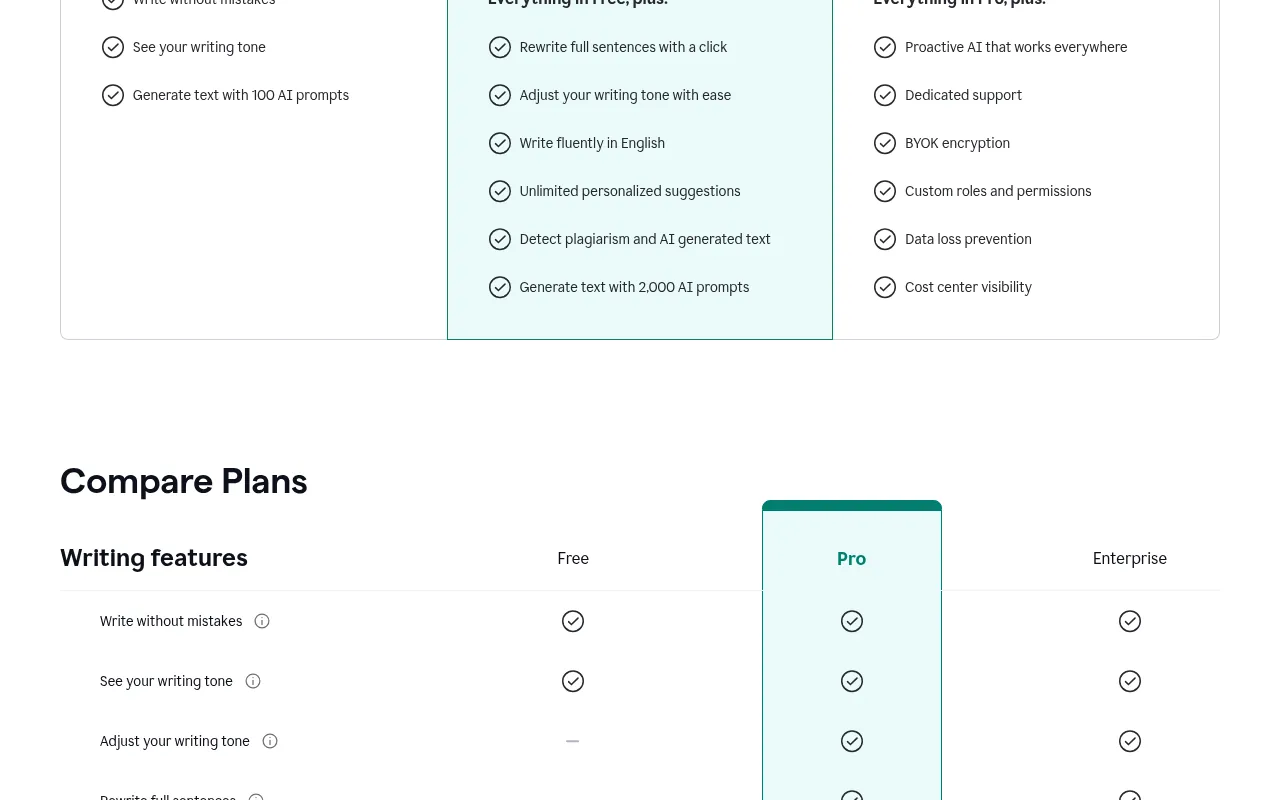
Grammarly Pro is the main paid Grammarly plan. It is marked “For eligible individuals and teams” on the plans page, and it includes everything in Free, plus:
- Rewrite full sentences with a click
- Adjust your writing tone with ease
- Write fluently in English
- Unlimited personalized suggestions
- Detect plagiarism and AI-generated text
- Generate text with 2,000 AI prompts per member per month
Pro also adds team features, such as account roles and permissions, a style guide, brand tones, snippets and an analytics dashboard. You can add more members to the same Pro plan, and each extra seat is charged at the same per-member rate, prorated for the time left in your billing period.
Grammarly Enterprise: custom pricing
Enterprise is for larger organizations. Grammarly lists it as “available through Superhuman Go”, and you have to contact sales for a price. On top of Pro, it adds things like unlimited AI prompts, SAML single sign-on, SCIM, data loss prevention, bring-your-own-key (BYOK) encryption, custom roles, audit logs and dedicated support. Individual writers in India will not need it.
Where Grammarly Works (Same Price Everywhere)
One Grammarly subscription covers every app, so you do not pay extra per device. Grammarly’s site lists:
- Desktop: Grammarly for Windows and Grammarly for Mac
- Browser extensions: Chrome, Safari, Firefox and Edge
- Office tools: Grammarly for Microsoft Office and Google Docs
- Mobile: Grammarly for iPhone, iPad and Android
The free plan and Pro work in the same places; Pro simply unlocks more suggestions and features wherever you write. That is one reason I think the annual Pro price is reasonable for heavy writers: you are paying once for help in your email, documents, browser and phone keyboard.
Grammarly India Pricing in Rupees
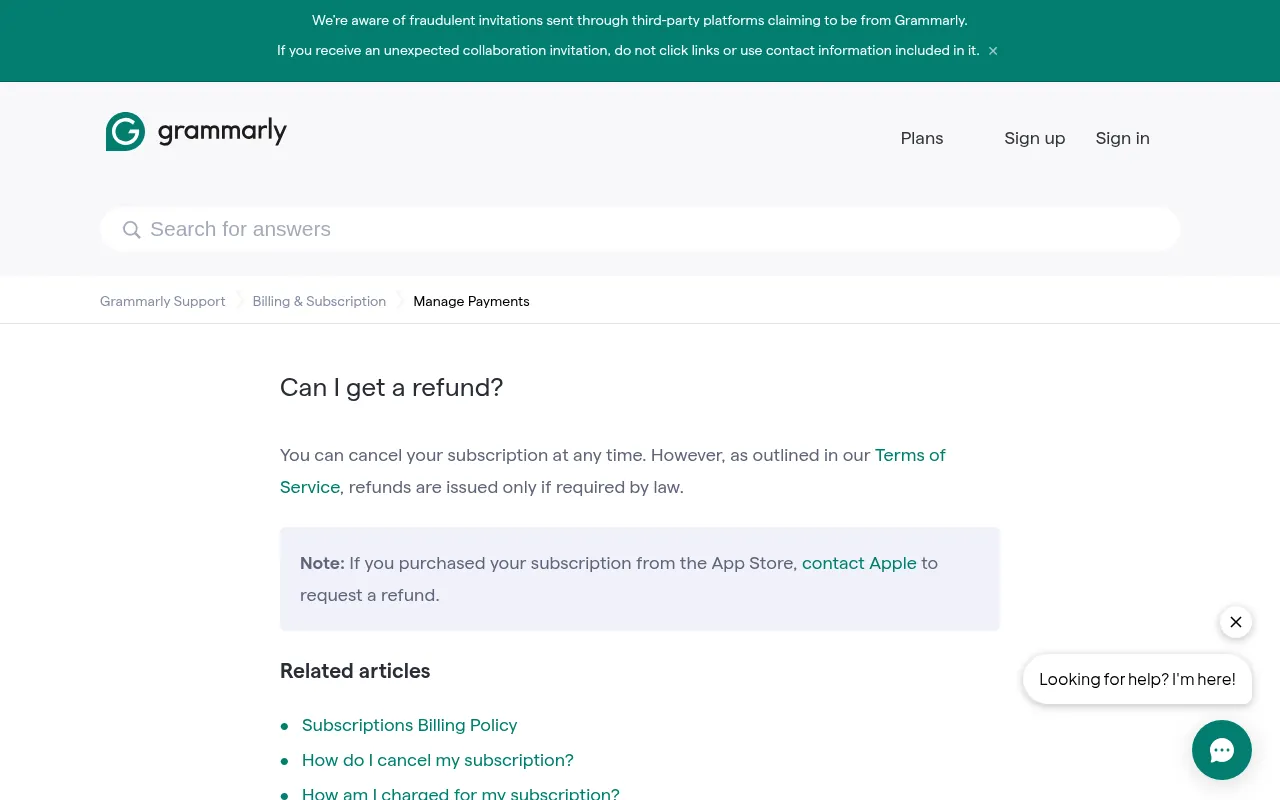
This is the part most Indian readers care about. Grammarly’s support center says the default currency is the US dollar, but it offers regional pricing in Euros, British pounds and Indian rupees, and the available rates and currency are displayed during checkout.
That has two practical effects:
- The USD prices are the global list prices. US$30 a month, US$60 a quarter and US$144 a year.
- Your checkout in India may show a rupee price instead. Because it is regional pricing, it does not have to match a straight dollar-to-rupee conversion.
Here is the Grammarly India price if you simply convert the dollar list price:
| Grammarly Pro billing | USD list price | Converted to INR (₹94.77) | With 18% GST (estimate) |
|---|---|---|---|
| Monthly | US$30 a month | about ₹2,843 a month | about ₹3,355 a month |
| Quarterly | US$60 per quarter | about ₹5,686 per quarter | about ₹6,710 per quarter |
| Annual | US$144 a year | about ₹13,647 a year | about ₹16,103 a year |
What I could not verify: Grammarly does not publish its rupee prices on any public page, and from my location the plans page and checkout data only showed US dollars. Some Indian websites report rupee prices (for example around ₹11,799 a year for the annual plan), but I could not confirm these on Grammarly’s own pages, so treat any rupee figure you read online, including my conversions, as an estimate. The final price is whatever Grammarly shows you at checkout when you sign in from India.
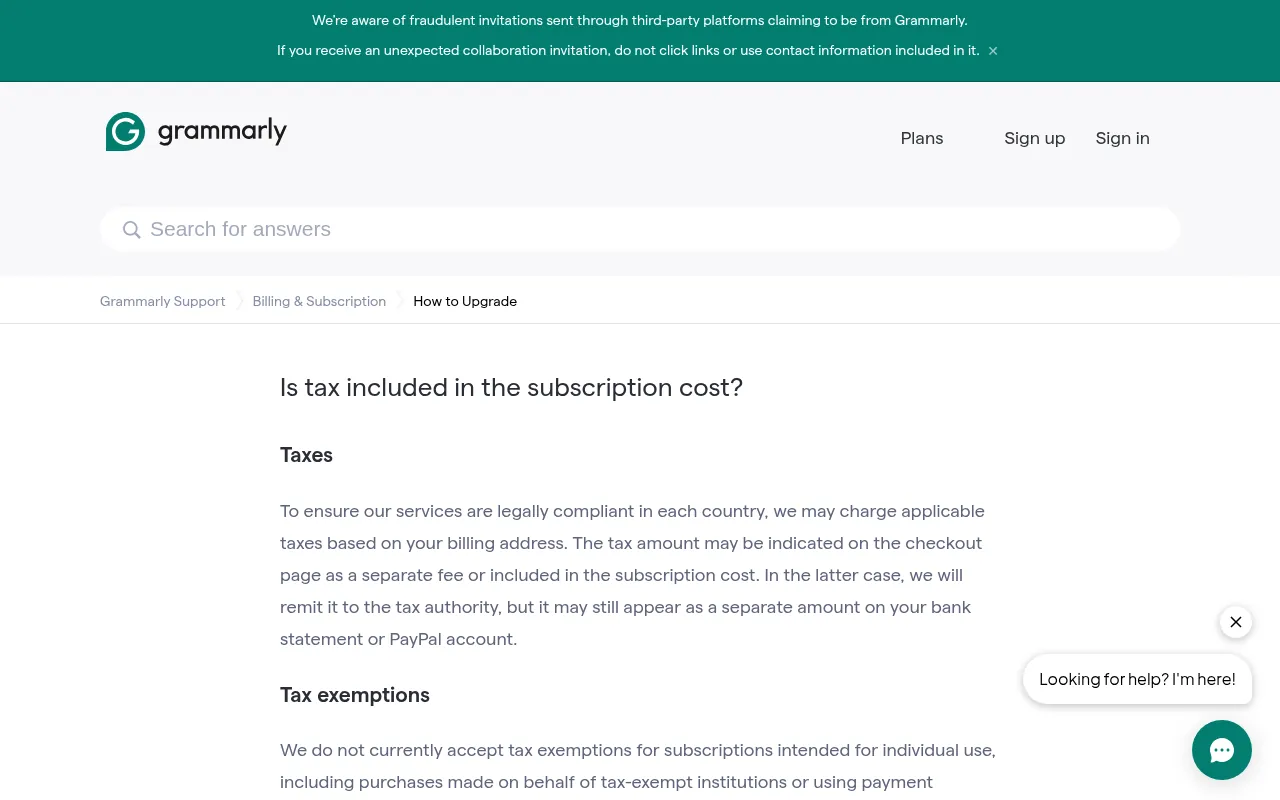
About GST: Grammarly’s support article on tax says it may charge applicable taxes based on your billing address, and the tax may appear as a separate line on the checkout page or be included in the subscription price. The 18% column above is only my estimate of the worst case.
Grammarly Pro Monthly vs Quarterly vs Annual: Which Billing Saves Money?
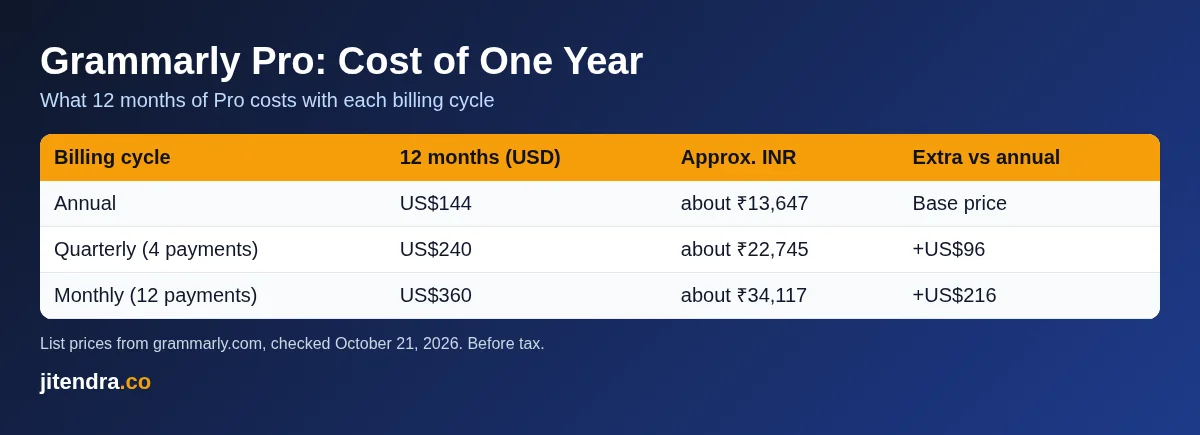
Grammarly charges very different amounts depending on how often you pay. Here is the cost of using Grammarly Pro for a full year with each billing cycle:
| Billing cycle | Cost for 12 months (USD) | Approx. INR | Extra you pay vs annual |
|---|---|---|---|
| Annual | US$144 | about ₹13,647 | Base price |
| Quarterly (4 payments) | US$240 | about ₹22,745 | US$96 more |
| Monthly (12 payments) | US$360 | about ₹34,117 | US$216 more |
My take:
- Pay annually if you write every day and already know Grammarly works for you. It is 60% cheaper than paying monthly.
- Pay quarterly if you want a commitment of only three months, for example during a thesis, a job hunt or a big content project.
- Pay monthly only for a short project. One month at US$30 is fine; twelve months at US$30 is an expensive habit.
Does Grammarly Have a Free Trial?
Yes. Grammarly’s plans page shows a “Try for free” button on Pro with “$0 payment today” and the line “Email reminder 2 days before trial ends.” Some versions of the plans page label that button “Start 7-day Free Trial”, but the exact trial length and which billing cycles include it are shown at checkout, so check the trial end date before you confirm.
Two things to know:
- You need a payment method to start the trial. If you do nothing, Grammarly starts billing when the trial ends.
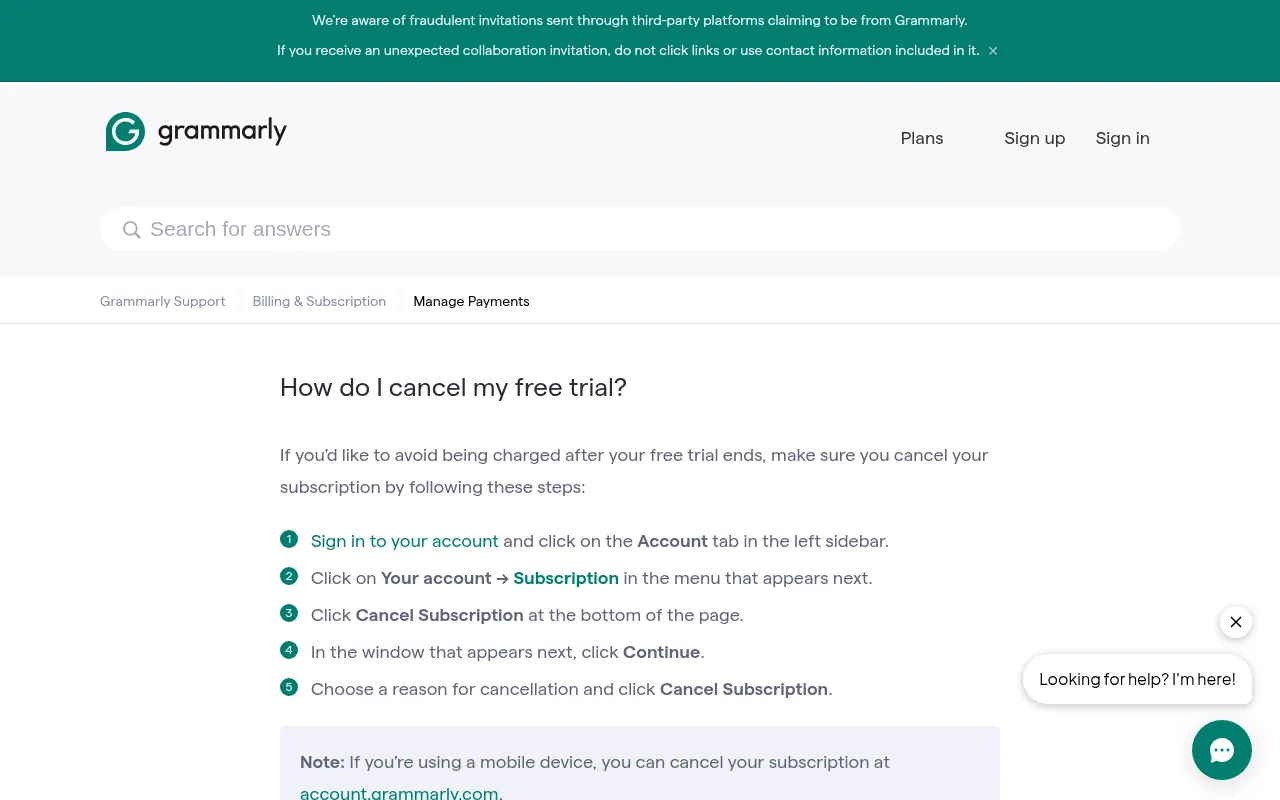
- Cancelling is easy and instant. Grammarly’s support center says that if you cancel, the trial ends immediately, your account becomes a free account without any charge, and you keep all your documents.
To cancel a Grammarly free trial:
- Sign in to your account and click the Account tab in the left sidebar.
- Click Your account and then Subscription.
- Click Cancel Subscription at the bottom of the page.
- Click Continue, choose a reason and confirm with Cancel Subscription.
On a phone, you can do the same at account.grammarly.com.
Grammarly Discounts, Student Pricing and Coupons
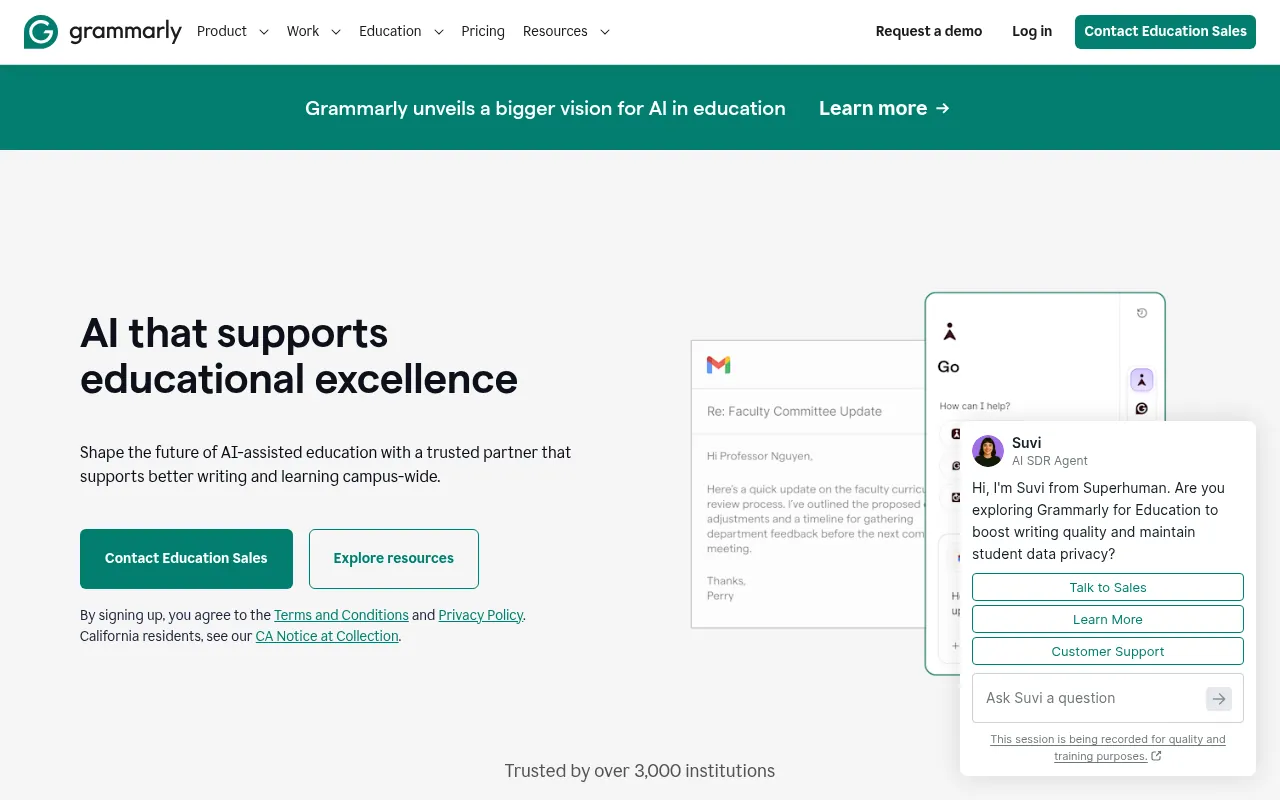
There is no permanent coupon that cuts the Grammarly Pro price for everyone. Here is what is officially available:
- Annual billing discount: the biggest saving, as the table above shows.
- Education plans: Grammarly’s plans page says it offers discounts for educational institutions, and it has a separate Grammarly for Education program for schools and universities. These are sold to institutions, not to individual students.
- Seasonal offers: Grammarly runs promotions from time to time. If a deal is live when you visit, it is shown on the plans page or in your account. I did not see any public discount on October 21, 2026.
Be careful with websites that promise a fixed “Grammarly Premium discount code for India”. Many of them are just affiliate links to the normal plans page. If a discount is real, Grammarly will show it at checkout before you pay.
Grammarly Refund Policy
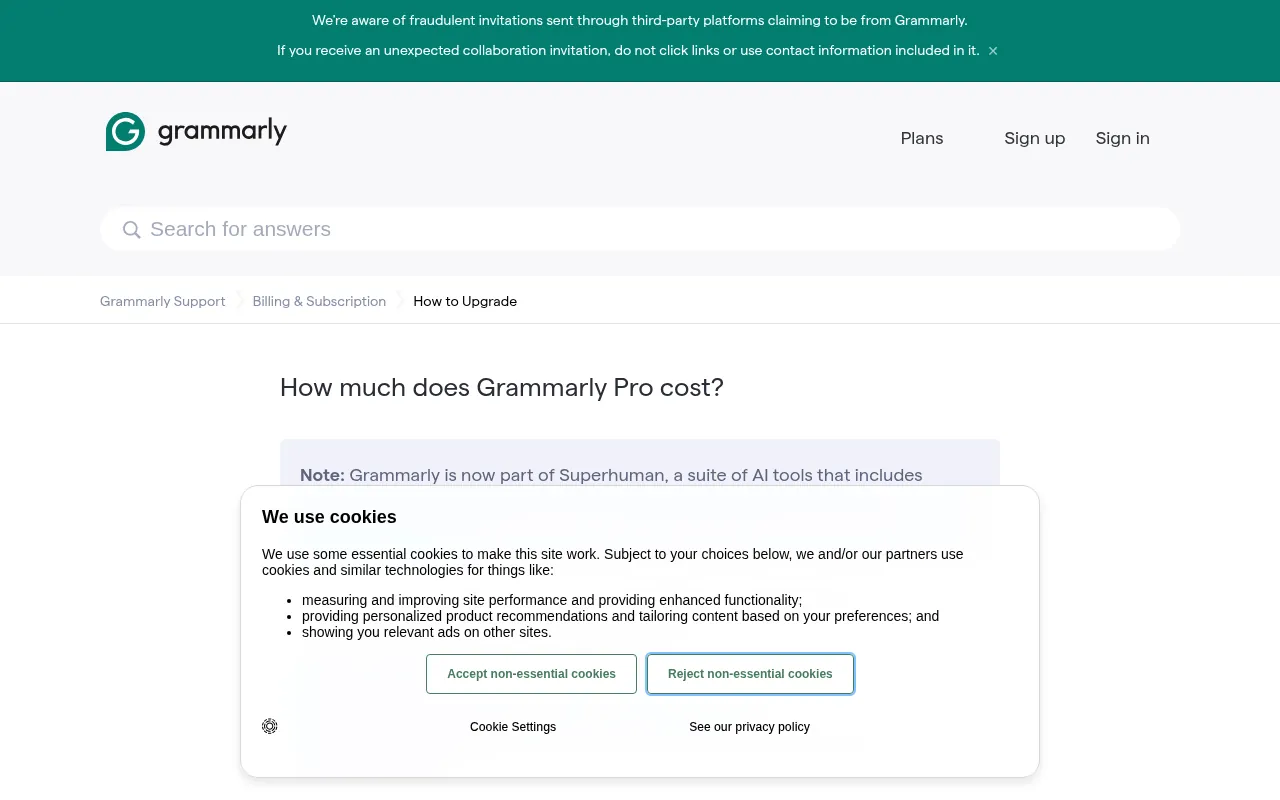
Grammarly’s refund policy is strict. Its support article “Can I get a refund?” says you can cancel your subscription at any time, but, as outlined in its Terms of Service, refunds are issued only if required by law. If you bought Grammarly through the Apple App Store, you need to ask Apple for a refund.
In plain words: once you are charged, assume you will not get the money back. That is why I recommend starting on the free plan, using the trial with a calendar reminder, and only then choosing a billing cycle.
How to Pay for Grammarly in India
Grammarly’s support center lists these payment methods:
- Credit cards and debit cards (except Visa Electron, Mastercard Maestro and Interac)
- PayPal
- Apple Pay and Google Pay
It does not accept personal cheques, money orders or payments by phone, and it notes that some payment methods may be unavailable because of payment processor restrictions. The list you see at checkout is the final one. UPI is not mentioned on Grammarly’s support page, so I would not count on it. If your Indian card is blocked for international transactions, enable international usage in your bank app before you buy.
For teams buying Pro for 10 or more members on an annual plan, Grammarly’s FAQ says you can request an invoice and pay by bank transfer, card, Apple Pay or Google Pay.
Grammarly Pro Price for Teams
Since Pro replaced Grammarly Business, teams in India now buy the same Pro plan and add seats. Grammarly’s support center says Pro plans allow up to 149 seats, each extra seat costs the same per-member rate as your plan, and Grammarly bills all seats as one payment. Here is what that looks like at list prices:
| Team size | Annual billing (USD) | Approx. INR per year | Monthly billing (USD) | Approx. INR per month |
|---|---|---|---|---|
| 1 member | US$144 a year | about ₹13,647 | US$30 a month | about ₹2,843 |
| 3 members | US$432 a year | about ₹40,941 | US$90 a month | about ₹8,529 |
| 5 members | US$720 a year | about ₹68,234 | US$150 a month | about ₹14,216 |
| 10 members | US$1,440 a year | about ₹136,469 | US$300 a month | about ₹28,431 |
If you add a member in the middle of your billing period, Grammarly charges a prorated amount for the days left. For a small agency or content team, the team features in Pro (one style guide, shared brand tones, snippets and an analytics dashboard) are the main reason to put everyone on one plan instead of separate accounts.
The Grammarly price on the plans page is not always the exact amount that leaves your bank account. Before you buy from India, budget for:
- Tax: Grammarly may add tax based on your billing address, either as a separate line or included in the price.
- Foreign transaction fees: if you are charged in US dollars, your bank or card may add a foreign currency markup. Check your card’s terms.
- Auto-renewal: every Grammarly plan renews automatically at the end of the billing period. Turn off renewal in your account if you only want one cycle.
- Monthly billing creep: US$30 a month feels small, but it is US$360 over a year.
None of these are unusual for software bought from India, but they are the reason I always compare the final checkout total, not the headline price.
Grammarly Free vs Grammarly Pro: Is the Upgrade Worth It?
The difference between the two Grammarly plans comes down to whether you only need correct writing or better writing.
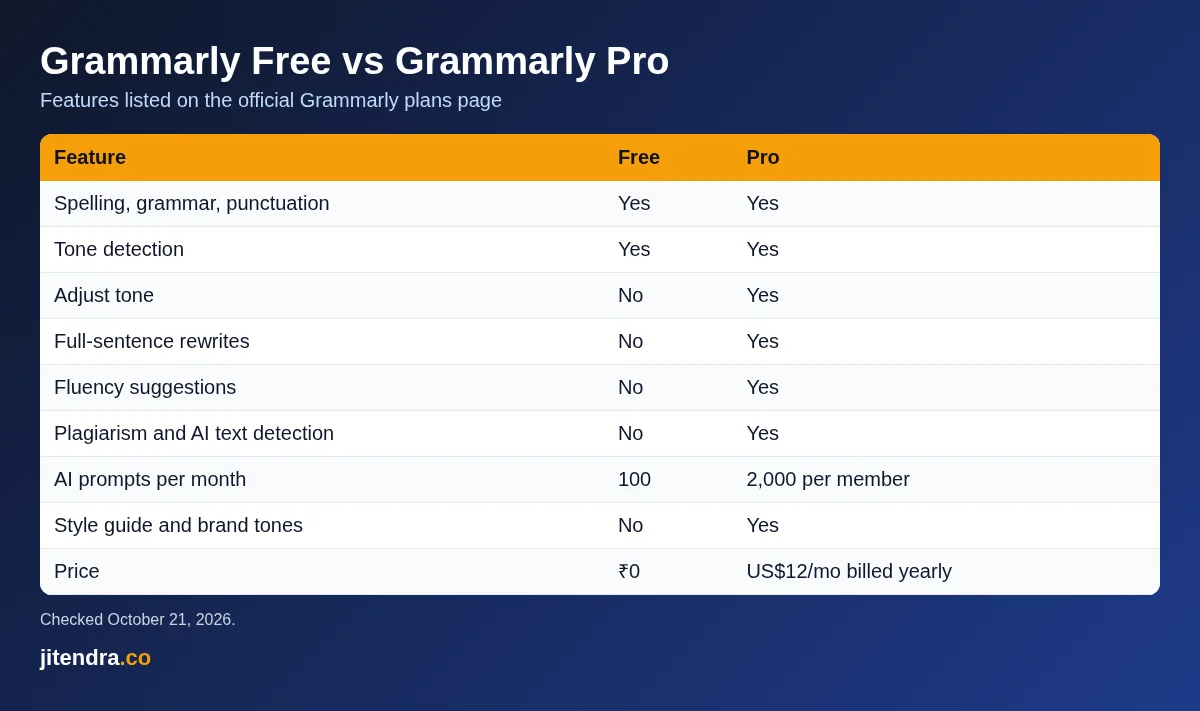
| Feature | Grammarly Free | Grammarly Pro |
|---|---|---|
| Spelling, grammar and punctuation | Yes | Yes |
| Tone detection | Yes | Yes |
| Adjust tone | No | Yes |
| Full-sentence rewrites | No | Yes |
| Fluency suggestions for non-native speakers | No | Yes |
| Plagiarism checker | No | Yes |
| AI text detection | No | Yes |
| AI prompts per month | 100 | 2,000 per member |
| Style guide and brand tones | No | Yes |
| Price | ₹0 | US$12 a month billed yearly |
Grammarly Pro is worth it if:
- You write in English for work every day: client emails, proposals, reports, blog posts or social posts.
- English is your second language and you want fluency suggestions, not just error fixes.
- You need a plagiarism or AI-text check before you submit or publish something.
- You run a small team and want one style guide and brand tone across everyone’s writing.
Stay on the free plan if:
- You mainly need spelling and grammar fixes.
- You write a few emails or assignments a week.
- You already pay for an AI assistant that rewrites text for you.
For most students and casual writers in India, the free plan is enough. For freelancers, marketers and anyone who writes for money, Pro pays for itself if it saves even an hour of editing a month.
Grammarly Pros and Cons
Pros
- Generous free plan: grammar, spelling, punctuation and tone detection at ₹0.
- Works almost everywhere: browser extension, Windows and Mac apps, Microsoft Office, Google Docs and mobile keyboards.
- Clear plan structure: one paid plan instead of three confusing tiers.
- Team features included in Pro: style guides, brand tones and snippets no longer need a separate Business plan.
- Regional rupee pricing at checkout.
Cons
- Expensive monthly billing: US$30 a month is a lot for an individual in India.
- No refunds except where the law requires them.
- Rupee prices are not published, so you only find out the exact price at checkout.
- The plagiarism and AI detection checks are paid features.
Best Grammarly Alternatives and Their Prices
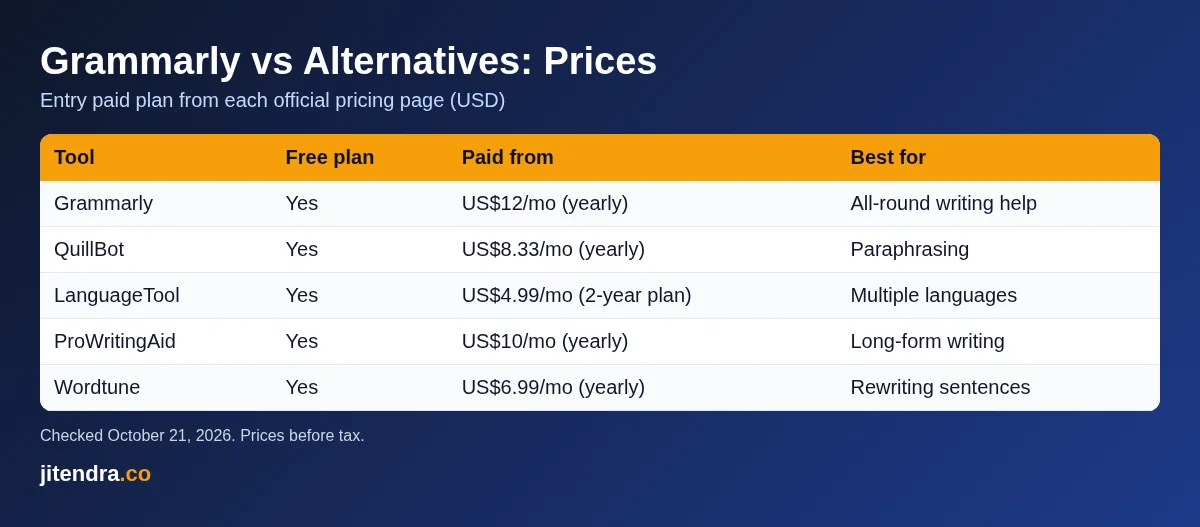
If the Grammarly price feels high, these alternatives are worth a look. All prices are from each tool’s official pricing page on October 21, 2026, in US dollars.
| Tool | Free plan | Paid plan from | Best for |
|---|---|---|---|
| Grammarly | Yes | US$12 a month (yearly) | All-round writing help |
| QuillBot | Yes | US$8.33 a month (yearly) | Paraphrasing and summaries |
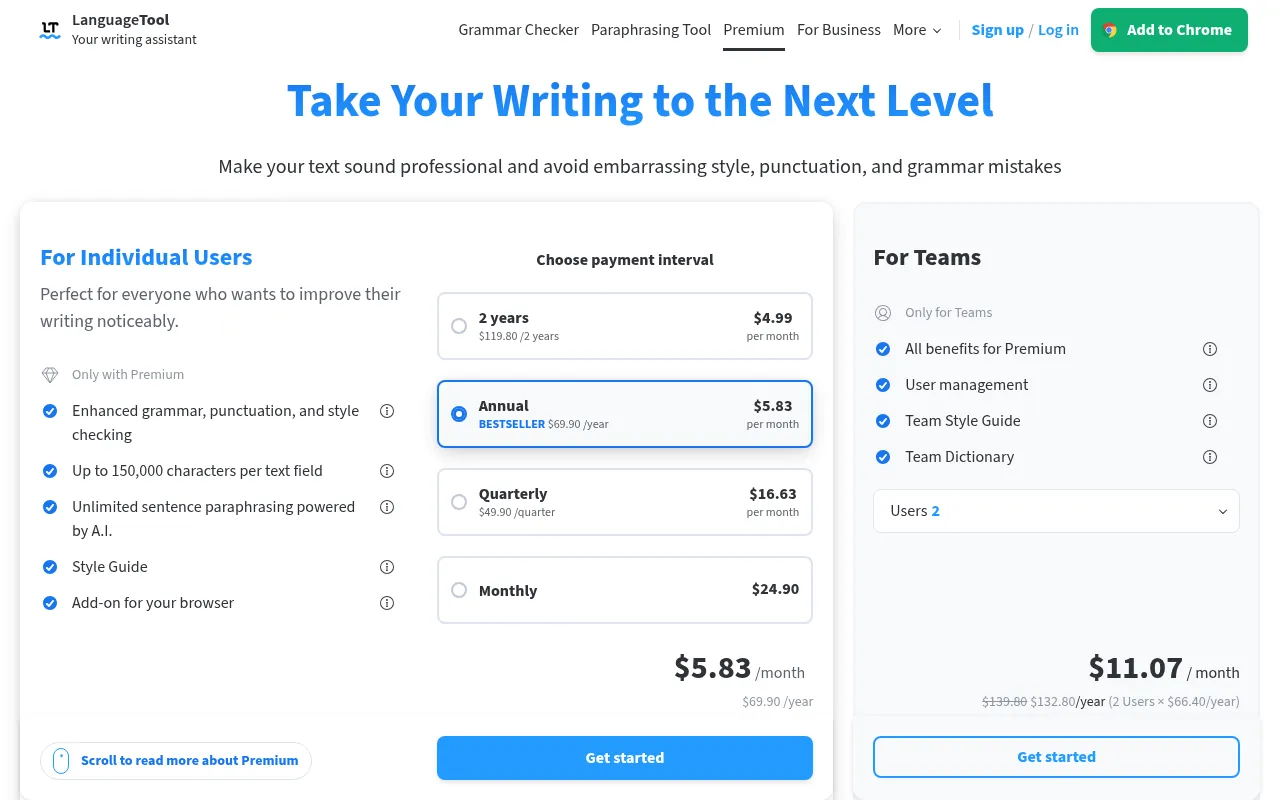
| LanguageTool | Yes | US$4.99 a month (2-year plan) | Multiple languages |
| ProWritingAid | Yes | US$10 a month (yearly) | Fiction and long-form writing |
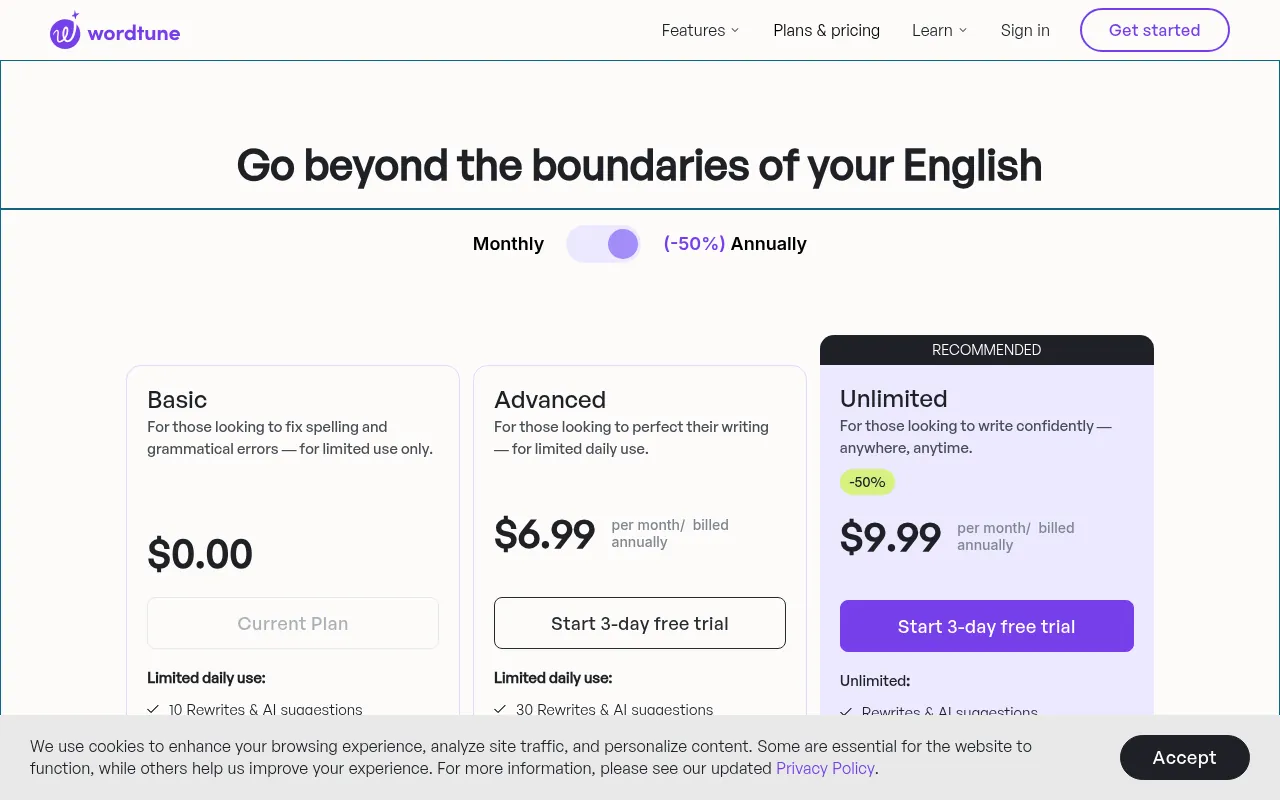
| Wordtune | Yes | US$6.99 a month (yearly) | Rewriting sentences |
QuillBot
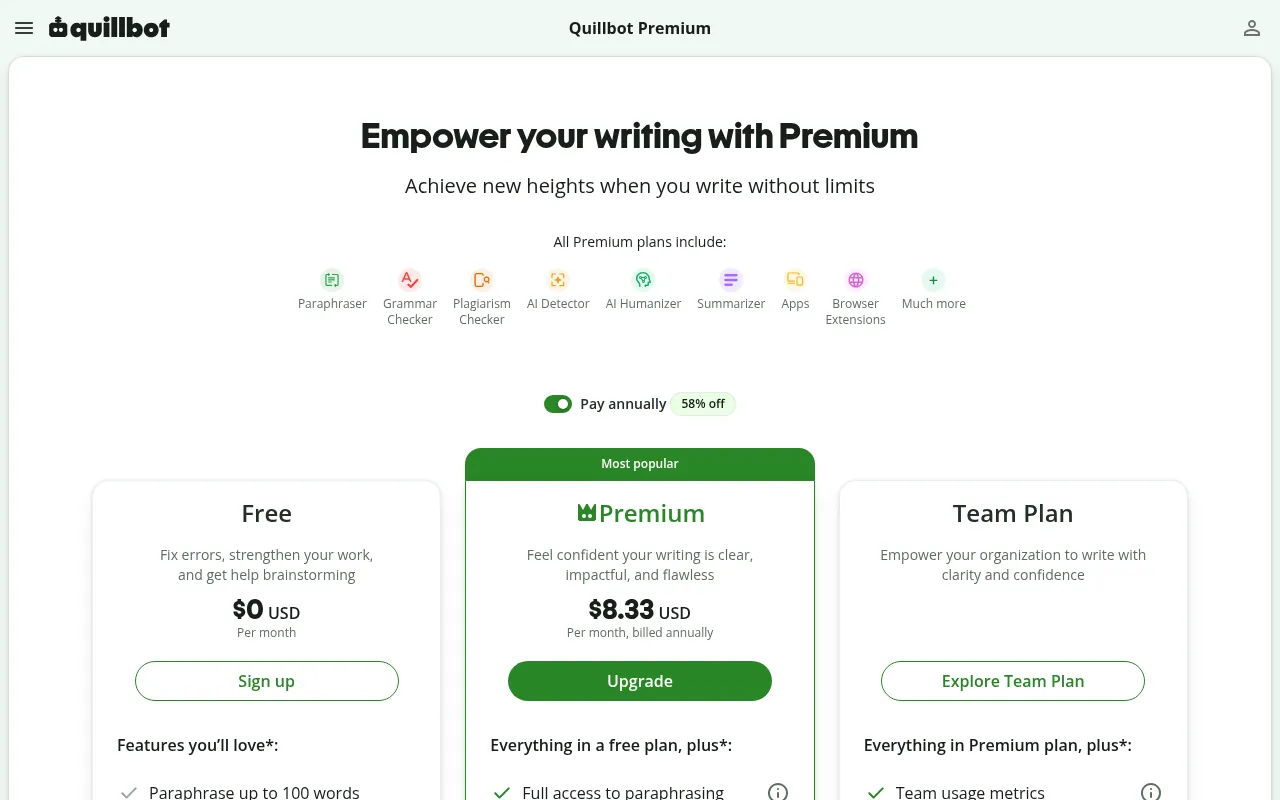
QuillBot’s free plan lets you paraphrase up to 100 words at a time in two modes, fix basic grammar errors and generate basic summaries. Premium costs US$8.33 a month when billed annually and unlocks unlimited paraphrasing modes, advanced grammar recommendations, the full AI detector and a plagiarism check. It is a good pick if you rewrite more than you proofread.
LanguageTool
LanguageTool is the best choice if you also write in languages other than English. Its Premium plan costs US$4.99 a month on a two-year plan (US$119.80 for two years), US$69.90 a year, or US$49.90 a quarter, according to its pricing page. It is the cheapest serious alternative to Grammarly Pro on this list.
ProWritingAid
ProWritingAid is built for authors and long-form writers. It has a free plan, Premium at US$10 a month billed yearly (US$120) or US$30 billed monthly, and Premium Pro at US$12 a month billed yearly. It also sells lifetime plans, which Grammarly does not offer, and its pricing page mentions a 3-day money-back guarantee on paid plans.
Wordtune
Wordtune focuses on rewriting sentences rather than catching every grammar error. It has a free plan with limited monthly use, and paid plans from US$6.99 a month billed annually.
If you mainly use AI chat tools for rewriting, my guide to the best free AI apps covers options that may already do what you need at no cost.
Which Grammarly Plan Should You Choose?
| You are | My pick | Why |
|---|---|---|
| A student | Free | Fixes grammar and spelling at no cost |
| A job seeker writing CVs and emails | Free, or one month of Pro | Use Pro only while you apply |
| A blogger or freelance writer | Pro, annual | Rewrites, tone and plagiarism checks pay off |
| A non-native English professional | Pro, annual | Fluency suggestions help every day |
| A small team or agency | Pro with extra seats | Style guide and brand tones for everyone |
| A large company | Enterprise | Security, SSO and admin controls |
My simple rule: start on Free, use the Pro trial on a real week of work, and only then pay. If you decide to pay, choose the annual plan.
How to Buy Grammarly Pro in India (Step by Step)
- Go to Grammarly’s plans page and click Try for free under Pro, or sign up for a free account first.
- Sign in with your email, Google, Apple or another supported account.
- Pick a billing cycle: monthly, quarterly or annual.
- Check the currency and total at checkout. This is where you will see Grammarly’s regional rupee price and any tax.
- Add a card, PayPal, Apple Pay or Google Pay.
- Set a reminder a few days before the trial ends, so you can cancel if Pro is not worth it for you.
- Install the browser extension or desktop app so Grammarly works wherever you write.
Why Trust Me

I am Jitendra Vaswani, an SEO consultant with 12 years in search. I founded Digiexe and AffiliateBooster, and I am an author and international speaker.
Writing and editing is a daily part of my work, from client proposals to long blog posts, so I care about what writing tools actually cost. Every price, feature and policy in this guide comes from Grammarly’s official plans page and support center, checked on October 21, 2026, and the alternatives’ prices come from their own pricing pages. Rupee figures are conversions at the FBIL reference rate, and I have clearly marked what I could not verify. I have not invented accuracy scores or test results.
Personal Operator Notes on Grammarly Pricing in India
I have watched Grammarly become default infrastructure for English publishing teams. DigiExe writers use grammar help, but editors still own voice. That split is the whole review: pay for assistance, not for abdication.
Free Grammarly catches obvious issues. Premium or Pro-style tiers add clarity and tone suggestions that help non-native writers shipping to global SERPs. On BloggersIdeas, tone still must sound like our brand, not like generic corporate English. Personalized editing means accepting some suggestions and rejecting the ones that flatten personality.
INR Budgeting Without Fantasy Coupons
Official pricing is commonly listed in USD. Convert with a buffer. Student discounts and promo codes change. Verify on grammarly.com/plans before you write a purchase order. This page explains decision framing, not a live price API.
Grammarly Versus ChatGPT for Editing
ChatGPT-class tools can rewrite. Grammarly-class tools can coach line by line inside the document. I use both differently. Rewrites risk losing my voice. Inline coaching keeps my stories about SEO since 2013 intact while cleaning grammar. For jitendra.co upgrades, voice preservation wins.
Team Seats and Quality Control
If you buy team seats, run a one-hour training: how to accept, how to ignore, how to protect confidential text, how to keep CTAs human. Without training, Premium becomes a false sense of security.
Extended Grammarly FAQ
Is there a free trial?
Trials appear and disappear. Check the official site.
Student pricing in India?
Education offers exist in some regions with verification. Confirm eligibility on Grammarly education pages.
Refunds?
Use Grammarly support documentation for the current refund window. Screenshot your request.
Will Grammarly make my SEO content rank?
No tool ranks content alone. Depth, experience, and links matter. Grammarly helps readability. It does not replace expertise.
Grammarly Inside My Editorial QA Stack
Before a jitendra.co article goes live, humans check:
- Facts and official prices
- Personal experience paragraphs
- Internal links
- sounds-human style issues
- Grammar and clarity
Grammarly helps step 5. It does not own steps 1-4. That ordering is how we keep personalized depth while staying clean for global readers.
Common Over-Corrections I Reject
- Flattening Indian English brand voice into US corporate tone
- Breaking intentional short paragraphs used for scannability
- “Fixing” product names into wrong dictionary words
- Softening direct CTAs into mush
Editors need courage to hit ignore.
Pricing Psychology for Indian Buyers
Annual plans look cheaper per month and hurt more if unused. I recommend monthly until a writer proves daily use for two weeks. DigiExe seats follow usage, not optimism.
Grammarly for Non-Native Teams Across 28 Countries
DigiExe collaborates across many countries. A shared grammar tool reduces variance. It does not replace native review for market-facing campaigns in local languages. English tooling is not Malayalam or Spanish localization.
Student and Educator Notes
If you qualify for education pricing, great. If you do not, do not fake an .edu story. Buy honest plans.
Alternatives Mentality
LanguageTool, native Docs suggestions, and LLM rewrites all exist. Pick based on workflow surface (browser extension vs docs) and privacy comfort. I care more about where text is sent than about brand loyalty.
Grammarly for Sponsor Email Tone
Sponsor inbox work needs warm, clear English without sounding like a template bot. I let Grammarly flag grammar, then I rewrite warmth myself. Inside A Hustler’s Brain guest invites get the same treatment. Correctness plus personality is the brand.
Installation Surface Choices
Browser extension, desktop app, mobile keyboard – pick the surfaces you actually write on. Paying for everything and using nothing is how SaaS budgets die.
India-Focused Payment Notes
- Expect USD pricing on many checkouts
- Keep card statements labeled for your CA
- Cancel trials on the calendar, not in your head
- Re-read plan names (Premium vs Pro branding shifts over years)
Worked Example: Cleaning a Review Paragraph
Original messy draft goes through Grammarly. I accept subject-verb fixes. I reject tone suggestions that remove first-person experience about DigiExe or BloggersIdeas. The personal touch is intentional, not an error.
Grammarly Goals by Role
Role: BloggersIdeas writer
Use Grammarly to catch errors. Keep first-person experience intact. Do not let tone suggestions erase India-specific examples.
Role: DigiExe account manager
Use Grammarly on client emails. Then add human warmth. Correct cold emails still lose if they sound robotic.
Role: Student
Free may be enough. Upgrade if you write long papers daily and the suggestions teach you.
Role: Founder writing investor updates
Clarity matters. Over-polished fluff hurts. Accept grammar, reject empty corporate synonyms.
Privacy Habits
Do not paste confidential payroll into any cloud grammar tool if policy forbids it. Use local-only modes if available for sensitive text. When unsure, write sensitive passages offline.
Teaching Ignore Skill
I run exercises where writers must ignore ten bad suggestions on purpose. Blind accept is how brands lose voice. Personalized sites need human taste.
Pricing Review Cadence
Every six months: open grammarly.com/plans, count active seats, remove unused, decide monthly vs annual. Same cadence as hosting and SEO tools.
Connection to ChatGPT vs Grammarly Guide
I maintain a separate comparison mindset: generative rewrite versus inline coaching. Link readers to that distinction rather than forcing one winner. Your workflow surface decides.
Extra FAQ Desk
Does Grammarly work in WordPress?
Extensions and copy workflows vary. Many writers edit in Docs then paste. Test your CMS.
Mobile writing quality?
Mobile keyboards help short replies. Long articles still deserve desktop review.
Can Grammarly replace an editor?
No. Editors catch factual and structural issues Grammarly never sees.
Often yes if volume is high and training exists. Otherwise you pay for ignored underlines.
Month-Long Grammarly Seat Audit Template
Create a sheet with columns: name, seat yes/no, last active week, content types written, keep/cut. Run it every quarter. DigiExe cuts seats without drama when usage is zero. Personalized finance is part of SEO ops maturity.
Before-After Editing Example Mentality
I keep private before/after snippets for training. I do not invent public before/after with fake metrics. Writers learn faster from their own drafts.
India English and Global SERP
We write in English for global searchers while keeping Indian examples. Grammarly sometimes nudges American spelling. Choose a style guide and stick to it per site. BloggersIdeas has house rules. jitendra.co has house rules. Consistency beats chasing every underline.
Sponsor Reply Speed Versus Quality
Speed matters in sponsor inbox triage. Grammarly helps speed. Templates help speed. Personalization still closes deals. I never send a fully automated reply that ignores the brand’s brief.
How I Use Grammarly Without Losing My Voice
Grammarly is a seat in my writing stack, not the author. BloggersIdeas posts, jitendra.co guides, sponsor replies, and DigiExe proposals all go through a human pass. I accept spelling and clear grammar fixes quickly. I reject tone suggestions that erase India-specific examples, first-person opinions, or direct sentences.
DigiExe Proposal Pass
Client proposals need clarity more than corporate polish. Grammarly helps catch missing words after late edits. It should not turn a founder-led proposal into generic agency filler. Personalized sales writing keeps specifics: market, channel, and constraint.
BloggersIdeas Editorial Rules With Grammarly On
- Keep claim-source pairs intact.
- Do not let clarity rewrites remove numbers.
- Ignore suggestions that fight SEO entities you intentionally repeat.
- Re-read the first 100 words out loud after accepting a batch of fixes.
- Never paste confidential client drafts into a shared browser profile carelessly.
Team Seat Waste I Watch For
Annual Grammarly seats get bought and forgotten. Once a quarter I ask who still uses the extension weekly. Empty seats are not a badge. Cancel or reassign.
Grammarly Versus a Human Editor
For long cornerstone pages I still want a human editor who understands affiliate disclosures and Indian reader context. Grammarly catches mechanics. Humans catch “this paragraph will get us in trouble” moments.
Student and Startup Budget Path
If cash is tight, start free. Use Pro when you publish daily or send client-facing copy every day. Buying Pro because a YouTube ad scared you about commas is a weak reason.
India Card and Renewal Discipline
Same rule as other USD SaaS: screenshot checkout, note renewal date, disable auto-renew if you are testing, and keep the refund window on your calendar. Personalized finance hygiene beats coupon hunting.
Grammarly for LinkedIn and Email Cadence
Short LinkedIn posts still benefit from a quick Grammarly pass when you dictate on mobile. Sponsor follow-ups need a warmer tone than blog drafts. Adjust goals per document type instead of one global setting that fights you everywhere.
Extended Desk FAQ
Does Grammarly replace proofreading for sponsor articles?
No. It reduces typos. Disclosure and claim checks stay human.
Should every DigiExe freelancer get a seat?
Only if they write client-facing copy weekly. Design-only freelancers usually do not need it.
Is browser extension enough or do I need the doc editor?
Extension covers most Gmail and CMS fields. Long Google Docs drafts benefit from the full editor view.
Will Grammarly make my English sound American?
It can push that way. Keep Indian examples and spellings when they serve the reader. You own the accept button.
Grammarly Price India Decision Tree I Give Clients
- Do you publish or send client copy most weekdays? If no, stay free or week-to-week.
- Do multiple writers touch the same brand voice? If yes, consider shared style guidance plus selective Pro seats.
- Do you already pay for a human editor on cornerstone pieces? Keep Pro for speed, not as a replacement.
- Are you buying only because of a coupon countdown? Wait. Screenshot list price on a calm day.
- Will finance need GST-ready invoices? Confirm billing entity and invoice flow before annual commit.
Sample Weekly Writing Stack at BloggersIdeas
- Outline in Docs
- Draft in Docs or CMS
- Grammarly pass for mechanics
- Human pass for claims, disclosures, and internal links
- Rank Math fields last
Order matters. Grammarly mid-draft is fine. Grammarly after you strip sources is how errors sneak into publish.
What Personalized Tone Means on jitendra.co
These guides should sound like me: direct, practical, India-aware, no fake lab theater. If Grammarly suggests softer hedging, I often refuse. Readers come for a clear pick and clear price context.
Grammarly India Cost Planning Spreadsheet Columns
I tell small teams to track:
- Seat email
- Plan (Free or Pro)
- Billing interval
- USD list at purchase
- INR debited
- Renewal date
- Owner manager
- Weekly use yes/no
That sheet prevents silent renewals. DigiExe finance prefers boring trackers over surprise SaaS charges.
Voice Profile Caution
If Grammarly offers brand voice features, feed them samples that already sound like your published work. Do not feed confidential strategy decks. Personalized voice is curated on purpose.
Free Tier Maxing Before Pro
Turn on the extension. Fix spelling for two weeks. Note how often Pro-gated rewrites would have changed a client outcome. Buy Pro when the answer is weekly, not once.
Grammarly and AI Drafting Boundaries
I draft with my own notes first. AI helpers may outline. Grammarly cleans mechanics last. Blurring those stages produces confident nonsense. DigiExe client copy especially needs human ownership of claims.
Annual Versus Monthly in Plain Words
Monthly is for trials and uneven workloads. Annual is for daily publishers who already used Pro for a month and liked it. India buyers should convert USD to INR with buffer and then decide. Personalized budgeting ignores countdown timers.
Grammarly for Multilingual Indian Teams
Many DigiExe freelancers think in Hindi or another language and write client English second. Grammarly helps catch missing articles and tense slips. It should not erase localized examples that make India-facing pages convert. I tell writers to accept grammar fixes and defend examples.
Refund Window Habit
If you buy Pro to test, note the refund policy day on your calendar immediately. Testing without a calendar reminder is how accidental annual charges happen.
Grammarly Seat ROI Story for DigiExe Writers
If a writer publishes four client pages a month, Pro usually pays for itself in hours saved on mechanical cleanup. If they publish once a quarter, Free plus a human editor pass is enough. Personalized ROI is usage frequency, not fear of red underlines.
Grammarly India Buying Mistakes I See Repeated
Buying Pro on a personal card for company writing without expense notes. Sharing one login across five freelancers against the terms. Accepting every tone rewrite until the page sounds like nobody. Skipping the refund calendar. DigiExe avoids those by assigning seats to named writers and reviewing tone samples monthly.
FAQs
Grammarly Premium is now Grammarly Pro. Its list price is US$144 a year (about ₹13,647), US$60 a quarter (about ₹5,686) or US$30 a month (about ₹2,843). Grammarly offers regional rupee pricing at checkout, so the price you see in India may be lower.
How much does Grammarly cost per month?
Grammarly Pro costs US$30 if you pay month to month, or US$12 a month on average if you pay US$144 for a year. The free plan costs nothing.
Is Grammarly free in India?
Yes. The Grammarly Free plan is free forever in India and covers spelling, grammar, punctuation, tone detection and 100 AI prompts a month.
Does Grammarly charge in Indian rupees?
Grammarly’s support center says it offers regional pricing in Indian rupees, and the currency and rates are shown during checkout. Its public pages only list US dollar prices.
Does Grammarly have a free trial?
Yes. The plans page offers Pro with “$0 payment today” and an email reminder two days before the trial ends. If you cancel during the trial, your account becomes a free account with no charge.
Can I get a refund from Grammarly?
Grammarly only issues refunds when the law requires it. You can cancel at any time to stop future charges. App Store purchases have to be refunded through Apple.
Is there a Grammarly student discount in India?
Grammarly offers discounts for educational institutions through Grammarly for Education, but there is no public discount for individual students on its plans page. Students can use the free plan.
What happened to Grammarly Business?
Grammarly Pro replaced the Business plan. Pro now includes team features such as style guides, brand tones and roles, and it supports up to 149 seats.
Conclusion
The Grammarly price in India in 2026 is really the Grammarly Pro price: US$144 a year, US$60 a quarter or US$30 a month, which converts to about ₹13,647, ₹5,686 or ₹2,843. Grammarly offers regional rupee pricing at checkout, so check the final price there before you pay, and remember that refunds are only given where the law requires them.
My advice is simple. Use the free plan for everyday spelling and grammar, test Pro with the free trial on real work, and if it saves you time, pay yearly. If Pro feels expensive, LanguageTool and QuillBot cost less and cover most of what casual writers need. For more AI tools I use and recommend, see my AI tools page.
Sources
Plan names, prices, features, free trial details, payment methods, tax, refund and team policies were taken from Grammarly’s plans page and the Grammarly Support articles “How much does Grammarly Pro cost?”, “Can I get a refund?”, “How do I cancel my free trial?” and “Is tax included in the subscription cost?” on October 21, 2026. Alternative prices come from the official pricing pages of QuillBot, LanguageTool, ProWritingAid and Wordtune on the same day. Rupee conversions use the FBIL/RBI reference rate of ₹94.7691 per US dollar for October 19, 2026.

Jitendra Vaswani is a globally recognized expert in SEO and AI-driven digital marketing. He has spoken at leading international events and is the founder of Digiexe, a results-driven digital marketing agency; Venuelabs, a platform that helps brands amplify their voice with expert PR and marketing solutions; and AffiliateBooster, an affiliate marketing news site. With over a decade of hands-on experience, Jitendra has empowered countless businesses to thrive online. His bestselling book, Inside A Hustler’s Brain: In Pursuit of Financial Freedom, has sold more than 20,000 copies worldwide, reflecting his influence and dedication to helping digital marketers achieve success. Follow Jitendra on Instagram, X/Twitter, Facebook, and LinkedIn.