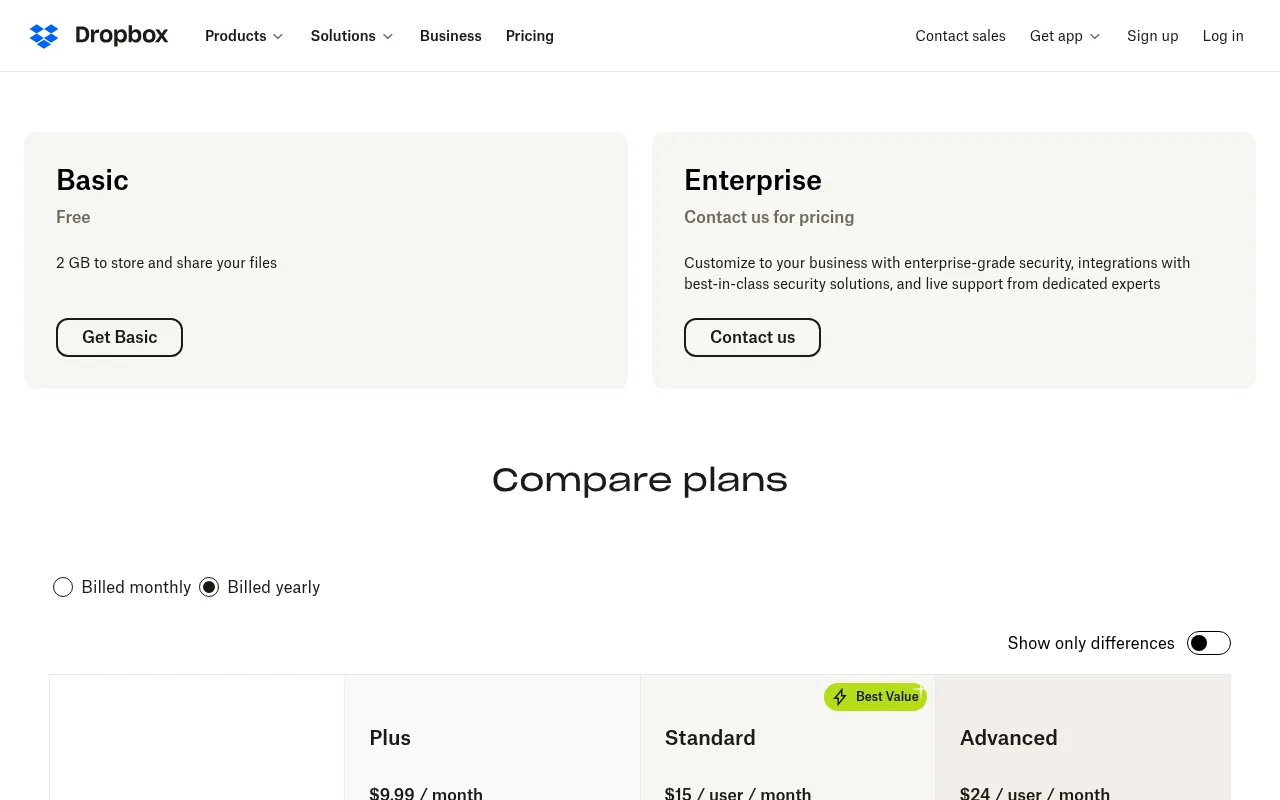
Dropbox pricing India, the short answer: Dropbox Basic is free with 2 GB. Dropbox Plus, the main personal plan, costs US$9.99 a month billed yearly (US$119.88 a year, about ₹11,361) or US$11.99 if you pay month to month (about ₹1,136). For teams, Dropbox Standard costs US$15 per user per month billed yearly (about ₹1,422) and Dropbox Advanced costs US$24 per user per month billed yearly (about ₹2,274), with a minimum of 3 users. Dropbox bills Indian customers in US dollars, adds tax at checkout, and payments are generally not refundable.
Cloud storage is one of those bills nobody thinks about until the phone says “storage full”. The question I keep getting from readers in India is always the same: what does Dropbox actually cost here, and is it worth it when Google, Apple and Microsoft all sell storage in rupees?
So in this guide I go through Dropbox pricing in India plan by plan for 2026. Whether you searched for Dropbox price India, Dropbox India pricing or Dropbox plans India, you will find every number here. Every price comes from Dropbox’s official plans page and Help Center, checked on October 21, 2026, and I convert the dollar prices to rupees so you can compare them with Indian alternatives. I also cover Dropbox free storage, the Family plan, business plans, tax, payment methods, refunds and the cheaper options I would consider first. I have not invented speed tests or scores, so everything here is either an official fact or clearly my opinion.
Dropbox Plans in India at a Glance (USD and INR)
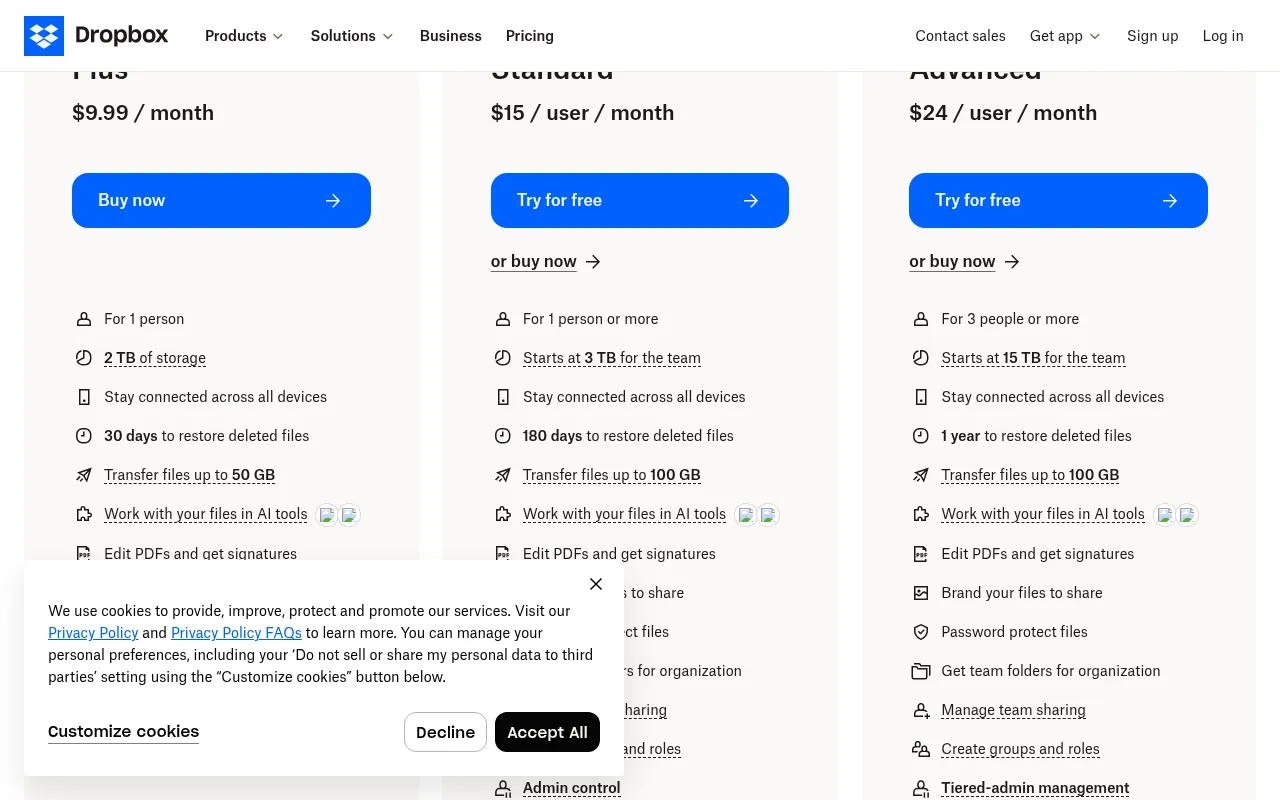
Here are all the Dropbox India plans in one table. Rupee figures use the FBIL reference rate of ₹94.77 per US dollar (October 19, 2026) and are rounded. They are before tax and before any foreign transaction fee your bank may charge.
| Dropbox plan | Users | Storage | Billed yearly (per month) | Billed monthly | Approx. INR (yearly, per month) |
|---|---|---|---|---|---|
| Basic | 1 | 2 GB | Free | Free | ₹0 |
| Plus | 1 | 2 TB | US$9.99 | US$11.99 | about ₹947 |
| Family | Up to 6 | 2 TB shared | Shown at checkout | Shown at checkout | Not listed |
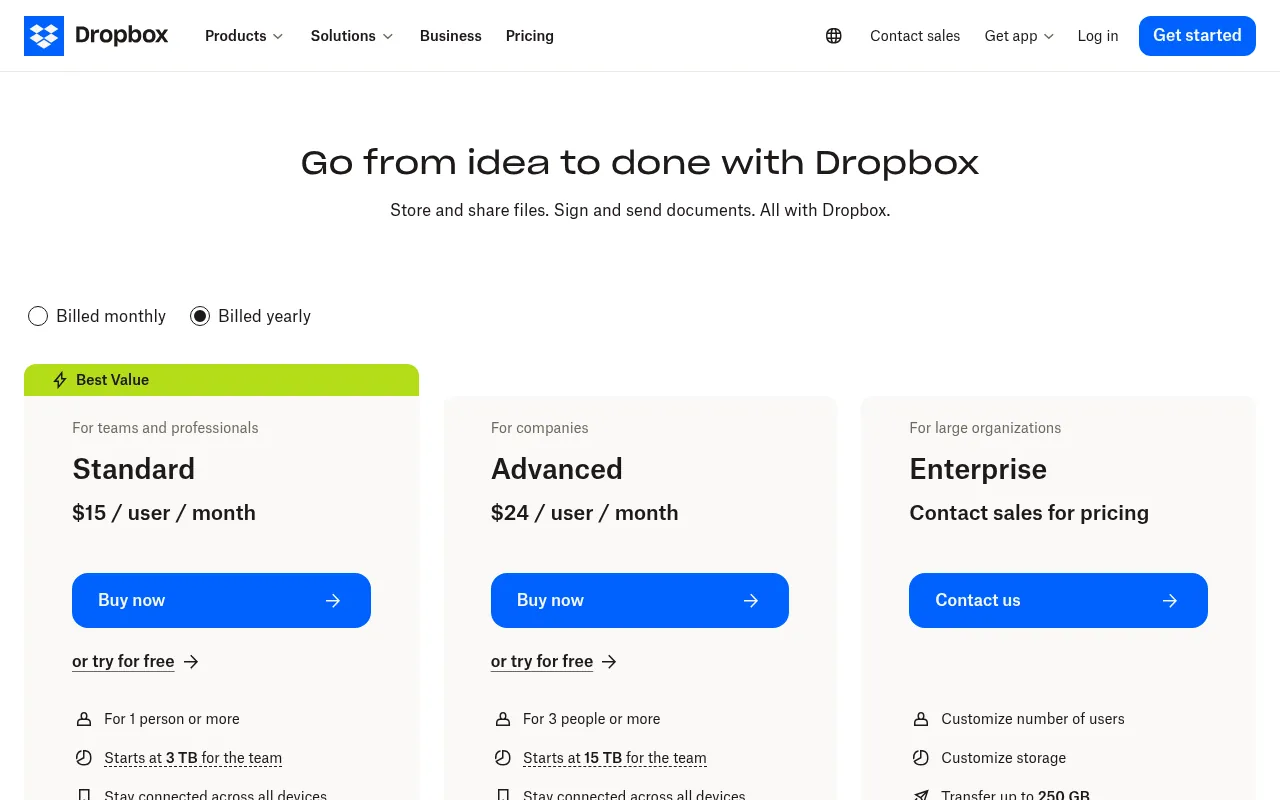
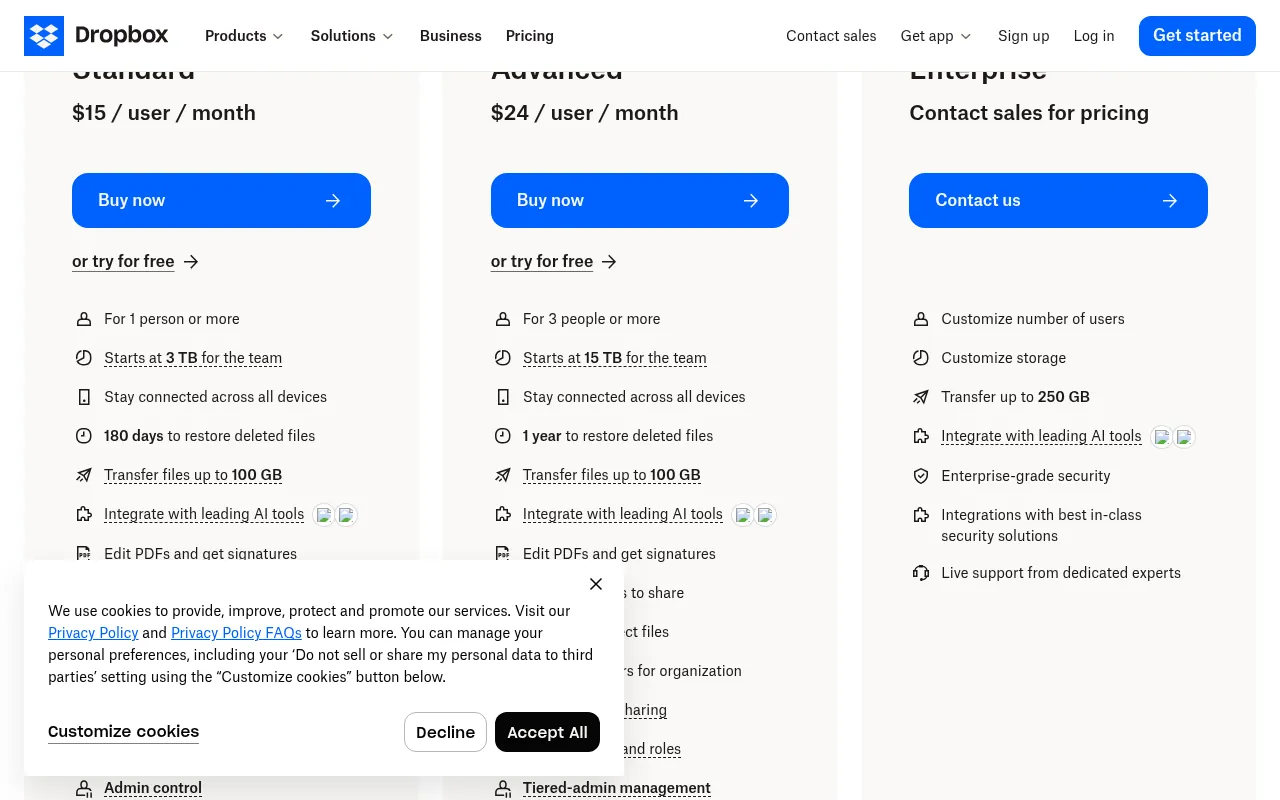
| Standard | 1 or more | Starts at 3 TB for the team | US$15 per user | US$18 per user | about ₹1,422 per user |
| Advanced | 3 or more | Starts at 15 TB for the team | US$24 per user | US$30 per user | about ₹2,274 per user |
| Enterprise | Custom | Custom | Contact sales | Contact sales | Custom |
Source: Dropbox plans page, Dropbox business pricing page and Dropbox Help Center, checked October 21, 2026.
The quick takeaways:
- Cheapest paid plan: Dropbox Plus at US$9.99 a month billed yearly, about ₹947 a month or ₹11,361 a year before tax.
- Free plan: Dropbox Basic gives you 2 GB and works on up to 3 devices.
- Yearly billing saves money: about 17% on Plus and Standard and 20% on Advanced compared with paying monthly.
- Currency: Dropbox does not bill in Indian rupees on dropbox.com. You pay in US dollars.
- Refunds: in most cases Dropbox payments are not refundable.
Dropbox Price India: Yearly vs Monthly Billing
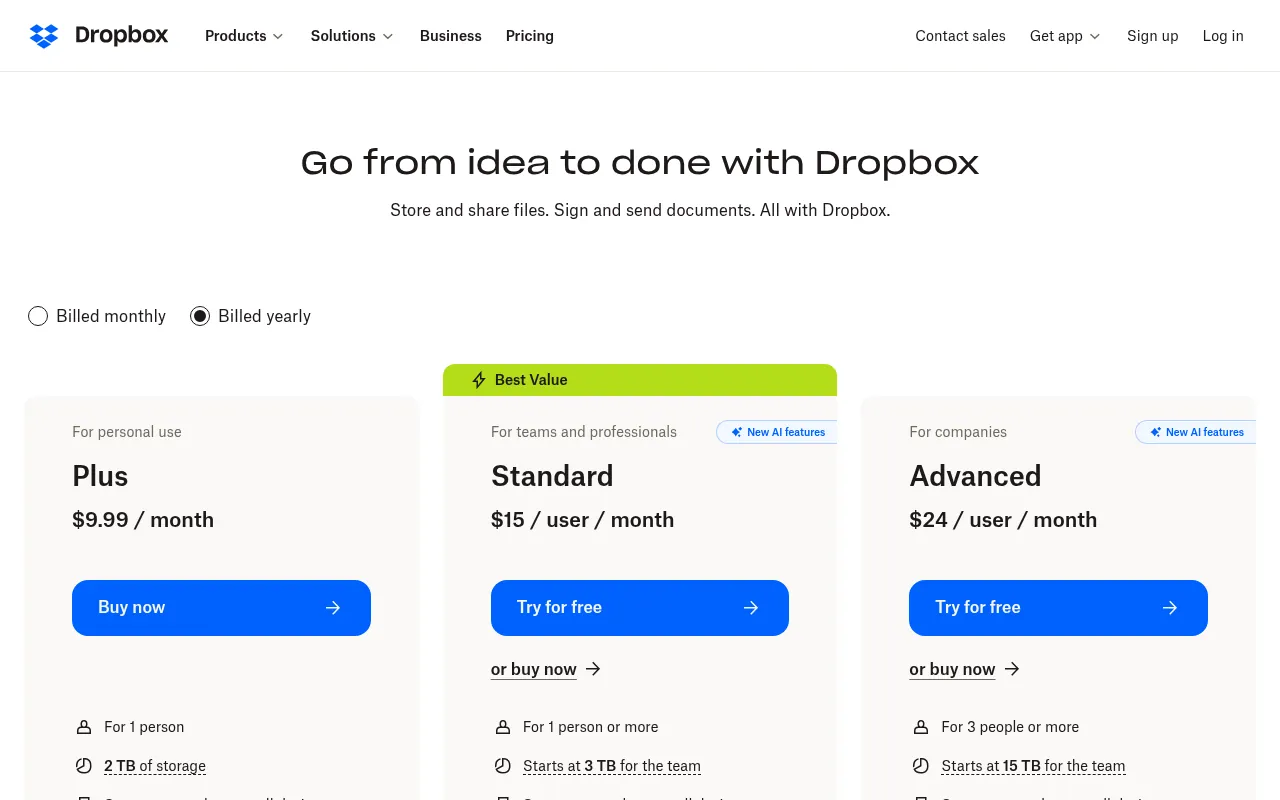
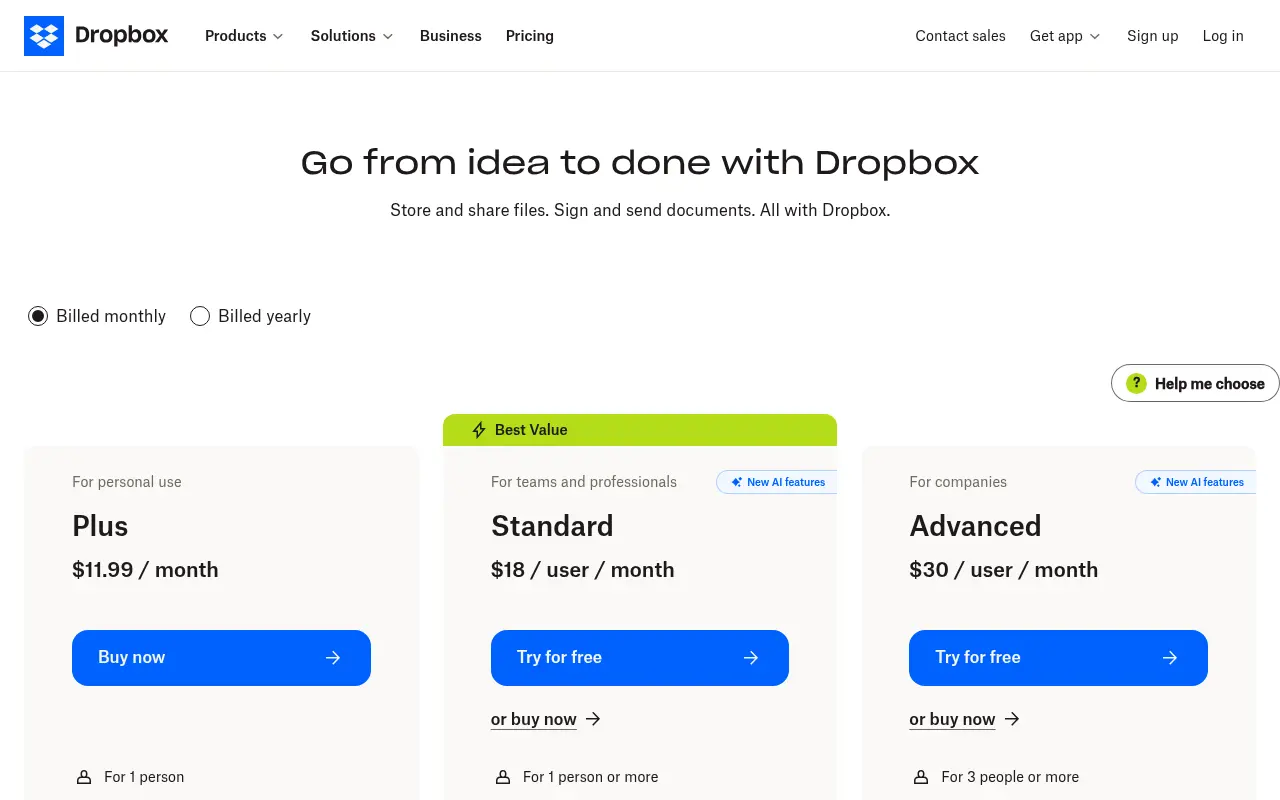
Dropbox shows two prices for every paid plan: one for yearly billing and one for monthly billing. The plans page defaults to yearly, which makes Dropbox look cheaper than it is if you plan to pay month to month.
| Plan | Billed yearly | Yearly total | Billed monthly | 12 months, paid monthly | You save with yearly |
|---|---|---|---|---|---|
| Plus | US$9.99 a month | US$119.88 (about ₹11,361) | US$11.99 a month (about ₹1,136) | US$143.88 (about ₹13,636) | US$24 (about ₹2,274) |
| Standard (per user) | US$15 a month | US$180 (about ₹17,059) | US$18 a month (about ₹1,706) | US$216 | US$36 per user (about ₹3,412) |
| Advanced (per user) | US$24 a month | US$288 (about ₹27,294) | US$30 a month (about ₹2,843) | US$360 | US$72 per user (about ₹6,823) |
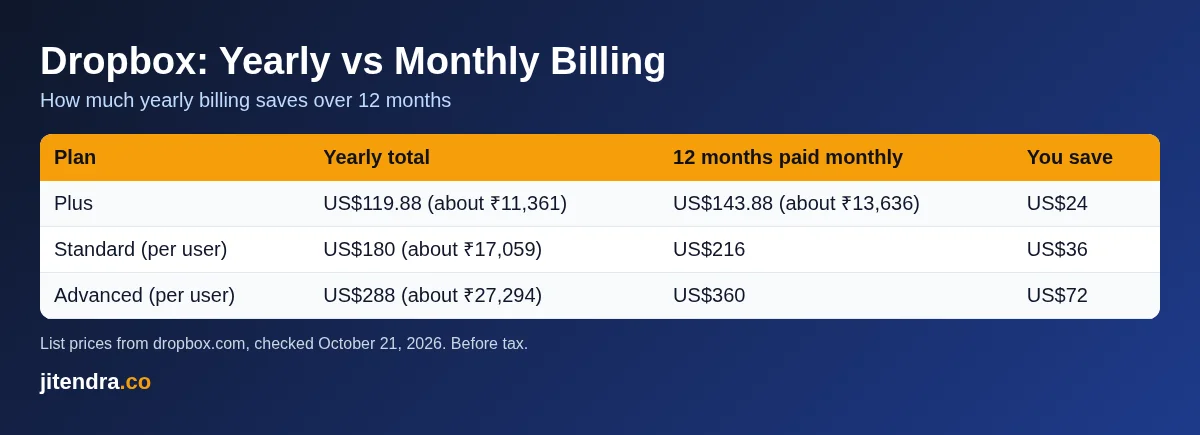
My rule of thumb: pay monthly for the first month or two while you test, then switch to yearly once you know Dropbox fits the way you work.
Dropbox Plans India: Each Plan Explained
Dropbox Basic: free with 2 GB
Dropbox Basic is the free Dropbox plan. According to Dropbox’s Basic page, you get:
- 2 GB of storage for one person
- Automatic backup of your computer files
- Connection on up to 3 devices
- File recovery and version history for the past 30 days
- Shared links that work for people without a Dropbox account, with previews of over 175 file types
Honestly, 2 GB is very little in 2026. A few hundred phone photos or a couple of long videos will fill it. Basic is fine for sharing documents or as a free way to receive files from clients, but it is not a real backup for your phone. For comparison, every Google account already includes 15 GB of free storage shared across Gmail, Drive and Photos.
Dropbox Plus: US$9.99 a month billed yearly
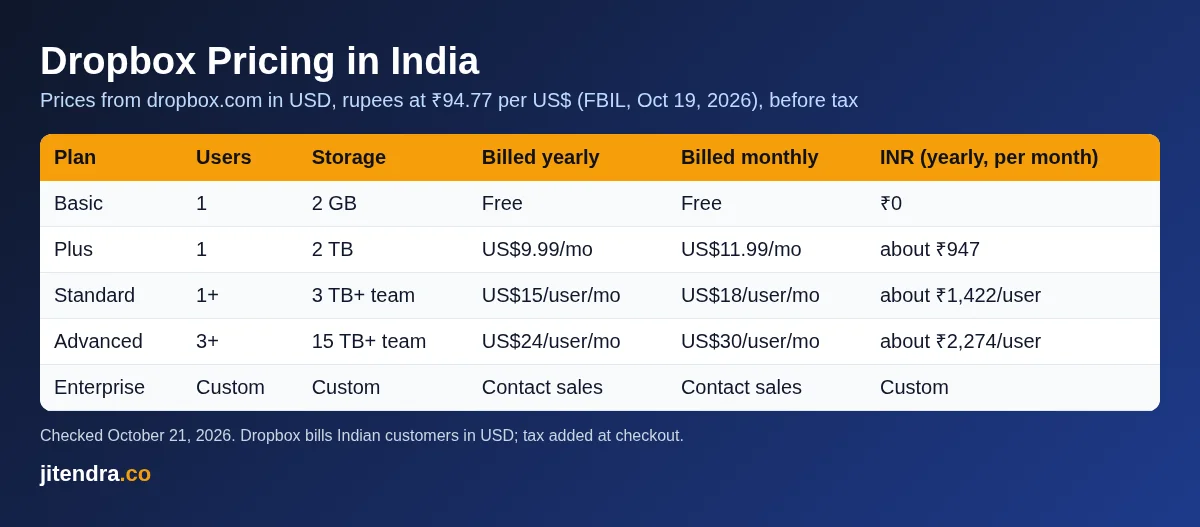
Dropbox Plus is the plan most individuals in India will consider. From the official plans page, Plus includes:
- 2 TB (2,000 GB) of storage for 1 person
- Access on all your devices
- 30 days to restore deleted files, with 30-day version history
- File transfers up to 50 GB
- Integrations with leading AI tools
- PDF editing and signatures, with unlimited self-signing and 3 signature requests a month
- Priority email support and live chat support
Dropbox Plus price: US$9.99 a month billed yearly (US$119.88 a year, about ₹11,361) or US$11.99 billed monthly (about ₹1,136 a month).
Plus makes sense if you work with large files, such as video projects, design files or RAW photos, and you want Dropbox’s sync and sharing. If you only need space for phone photos, Indian rupee plans from Google, Apple or Microsoft usually cost less, as I show below.
Dropbox Family: 2 TB for up to 6 people
Dropbox Family shares 2 TB of storage across up to 6 members. Dropbox’s Help Center says each member gets their own private Dropbox account, everyone can use a shared Family Room folder, and one person, the Family manager, handles billing for the whole plan. Members must be 13 or older in the United States and 16 or older everywhere else, and Family cannot be created with a corporate email address.
What I could not verify: the Family plan price is not shown on Dropbox’s main plans page from my location, so I cannot give you an official dollar or rupee figure. The price appears when you choose Family in your account or at checkout. If you see a fixed Dropbox Family price for India online, confirm it at checkout before you buy.
Dropbox Standard: US$15 per user a month billed yearly
Dropbox Standard is labelled “Best Value” and is aimed at teams and professionals, but it also works for a single person. The plans page lists:
- For 1 person or more, starting at 3 TB of storage for the team
- 180 days to restore deleted files
- File transfers up to 100 GB
- PDF editing and signatures
- AI in Dropbox for select teams, starting at 250 AI credits a month
- Branded sharing, password-protected files and links
- Team folders, groups and roles, and an admin console
Price: US$15 per user per month billed yearly (about ₹1,422) or US$18 per user billed monthly (about ₹1,706).
Dropbox’s own Professional page now points solo professionals to Standard, so this is the plan to look at if you work alone but need business features. If you are a freelancer who sends client files, the password-protected links, branded sharing and 180-day recovery are the main reasons to choose Standard over Plus.
Dropbox Advanced: US$24 per user a month billed yearly
Dropbox Advanced is for companies with at least 3 people. It includes everything in Standard, plus:
- Storage starting at 15 TB for the team
- 1 year to restore deleted files
- Tiered admin roles and single sign-on (SSO)
- End-to-end encryption and advanced key management
- Compliance tracking
- AI in Dropbox for select teams, starting at 750 AI credits a month
Price: US$24 per user per month billed yearly (about ₹2,274) or US$30 billed monthly (about ₹2,843).
If your team stores client contracts, financial records or personal data, Advanced’s end-to-end encryption, ransomware detection and recovery, and suspicious activity alerts (all listed only for Advanced in Dropbox’s plan comparison) are not a luxury. My roundup of data breach statistics shows how common breaches have become. With the 3-user minimum, the smallest Advanced team costs US$864 a year (about ₹81,881) on yearly billing or US$90 a month (about ₹8,529) on monthly billing.
Dropbox Enterprise: custom pricing
Enterprise is for large organizations that need custom user counts and storage, transfers up to 250 GB, enterprise-grade security integrations and live support from dedicated experts. Dropbox does not publish a price; you contact sales.
Dropbox Plans Compared: Feature by Feature
| Feature | Basic | Plus | Standard | Advanced |
|---|---|---|---|---|
| Price (billed yearly) | Free | US$9.99 a month | US$15 per user a month | US$24 per user a month |
| Users | 1 | 1 | 1 or more | 3 or more |
| Storage | 2 GB | 2 TB | Starts at 3 TB per team | Starts at 15 TB per team |
| Devices | Up to 3 | Unlimited | Unlimited | Unlimited |
| Restore deleted files | 30 days | 30 days | 180 days | 1 year |
| Send files with Transfer | Not listed | Up to 50 GB | Up to 100 GB | Up to 100 GB |
| PDF editing and signatures | Not listed | Yes | Yes, advanced | Yes, advanced |
| Password-protected links | Not listed | No | Yes | Yes |
| Admin console | No | No | Yes | Yes |
| End-to-end encryption | No | No | No | Yes |
| Single sign-on | No | No | No | Yes |
Dropbox Plus vs Dropbox Standard: Which One for a Single User?
Both plans can be bought by one person, so this is the comparison most freelancers in India get stuck on.
| Dropbox Plus | Dropbox Standard (1 user) | |
|---|---|---|
| Price billed yearly | US$119.88 a year (about ₹11,361) | US$180 a year (about ₹17,059) |
| Price billed monthly | US$11.99 a month | US$18 a month |
| Storage | 2 TB | Starts at 3 TB for the team |
| Restore deleted files | 30 days | 180 days |
| Transfer size | Up to 50 GB | Up to 100 GB |
| Password-protected and branded sharing | No | Yes |
| Admin console and team folders | No | Yes |
| AI in Dropbox | Integrations with AI tools | Starts at 250 AI credits a month for select teams |
Standard costs about US$60 a year more (about ₹5,686). You get more storage, six times longer file recovery, bigger transfers and professional sharing controls. If you send work to clients and a lost file would cost you money, Standard is worth the extra. If you mostly store your own files, Plus is enough.
Dropbox Cost Over 3 Years in India
Storage is a long-term bill, so it helps to see the total. Here is what 2 TB of cloud storage costs over three years with the main options, using the prices above. Dropbox figures are converted from US dollars at ₹94.77 and exclude tax; the other prices are the official rupee prices.
| Option (about 2 TB) | Per year | Over 3 years |
|---|---|---|
| Dropbox Plus, billed yearly | about ₹11,361 | about ₹34,083 |
| Dropbox Plus, billed monthly | about ₹13,636 | about ₹40,908 |
| iCloud+ 2 TB (₹749 a month) | ₹8,988 | ₹26,964 |
| Microsoft 365 Family, 2 TB shared (₹8,199 a year) | ₹8,199 | ₹24,597 |
The gap is not huge in year one, but over three years Dropbox Plus costs roughly ₹7,000 to ₹9,500 more than the rupee-priced options, before you even add tax on the Dropbox side. That is the price of Dropbox’s sharing and sync tools, and whether it is worth it depends on how much you use them.
Is Dropbox Safe? Security Features by Plan
Price is only half the decision when you store client files or family documents in the cloud. Here is what Dropbox’s own plan comparison lists for security, as of October 21, 2026:
| Security feature | Plus | Standard | Advanced |
|---|---|---|---|
| 256-bit AES and SSL/TLS encryption | Yes | Yes | Yes |
| Multi-factor authentication | Yes | Yes | Yes |
| Remote device wipe | Yes | Yes | Yes |
| Watermarking | No | Yes | Yes |
| Device approvals | No | Yes | Yes |
| Ransomware detection and recovery | No | No | Yes |
| Suspicious activity alerts | No | No | Yes |
| End-to-end encryption | No | No | Yes |
| Advanced key management | No | No | Yes |
My reading of this: every paid plan gets the basics (encryption in transit and at rest, two-step login and remote wipe), Standard adds controls that matter when you share files with clients, and the serious protection features sit only on Advanced. If you are a solo freelancer, Plus or Standard with multi-factor authentication turned on is enough. If a breach would be a legal problem for your business, budget for Advanced.
Dropbox Limits Most People Miss
A few limits on the plans page are easy to overlook before you pay:
- Basic works on only 3 devices. If you have a laptop, a phone and a tablet, a fourth device needs a paid plan.
- Signature requests are capped. Plus, Standard and Advanced each list 3 signature requests a month in the plan comparison, though self-signing is unlimited.
- Transfer sizes differ. Plus lets you send up to 50 GB with Dropbox Transfer; Standard and Advanced go up to 100 GB, and Enterprise to 250 GB.
- AI features are not for everyone. The AI tools on Standard and Advanced are marked “for select teams”, with a monthly allowance of AI credits.
- Team storage is pooled. On Standard and Advanced, storage “starts at” 3 TB or 15 TB for the whole team, not per person.
None of these are deal-breakers, but they are the details I would check against how you actually work before choosing a plan.
Dropbox Business Pricing in India for Teams
If you run a small business or agency in India, here is what Dropbox costs for common team sizes at list prices. Remember that Advanced needs at least 3 users.
| Team | Plan | Billed yearly (USD) | Approx. INR per year | Billed monthly (USD) |
|---|---|---|---|---|
| Solo professional | Standard, 1 user | US$180 a year | about ₹17,059 | US$18 a month |
| 3 people | Standard, 3 users | US$540 a year | about ₹51,176 | US$54 a month |
| 5 people | Standard, 5 users | US$900 a year | about ₹85,293 | US$90 a month |
| 3 people | Advanced, 3 users | US$864 a year | about ₹81,881 | US$90 a month |
Both Standard and Advanced have a “Try for free” button on Dropbox’s plans page, and the page title advertises a 30-day free trial. The exact trial terms are shown when you sign up, so read them before you add a card.
For an Indian team, the biggest question is whether you need Dropbox at all. If your team already pays for Google Workspace or Microsoft 365 for email, both include cloud storage per user, so Dropbox becomes an extra cost on top. Dropbox is worth it when your work revolves around large files and outside collaborators, such as video, design or architecture teams.
Does Dropbox Charge in Indian Rupees?
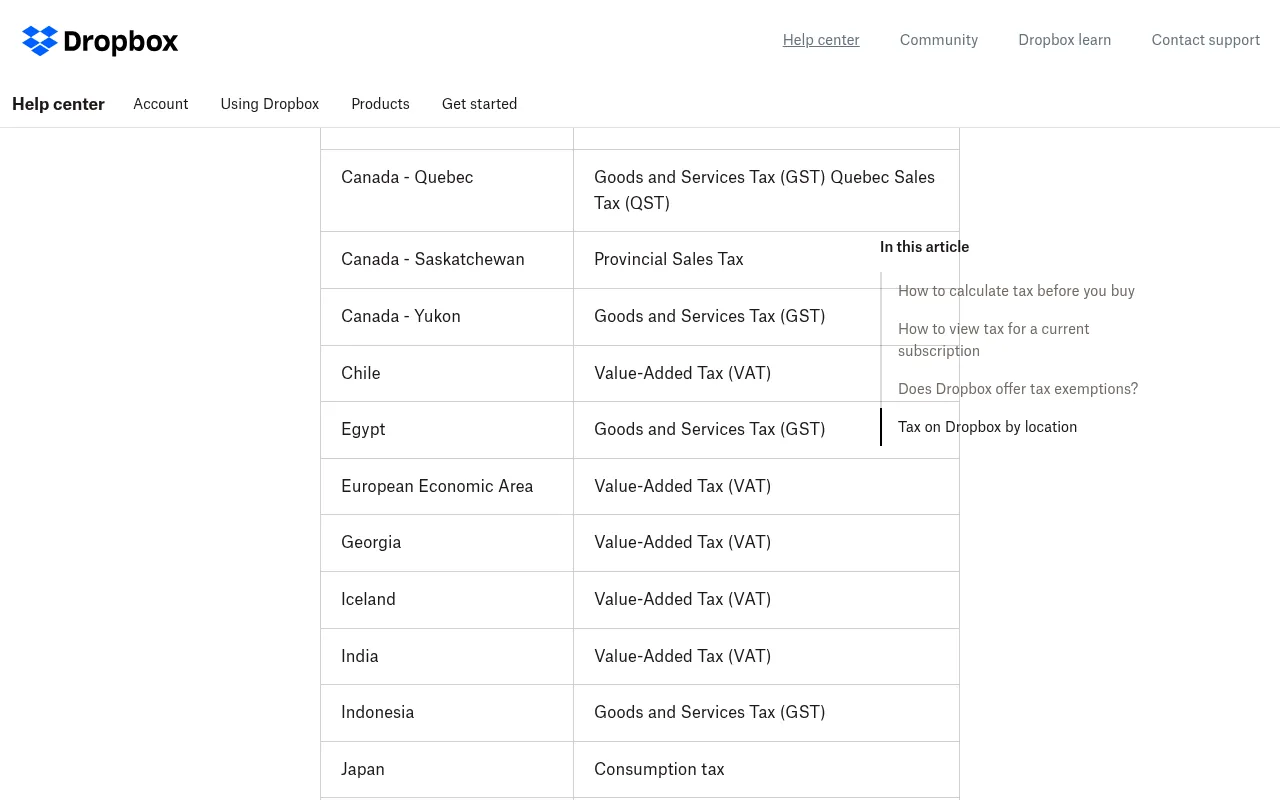
No. Dropbox’s Help Center lists the currencies it supports: Australian dollar, British pound, Canadian dollar, euro, Japanese yen and US dollar. The Indian rupee is not on that list. Your currency is based on the billing address you first used to buy a Dropbox subscription, so an Indian billing address is charged in US dollars.
Dropbox adds a note: if your preferred currency is not available, you can pay through the Apple App Store or Google Play Store. App store prices are set in local currency, so subscribing through the Dropbox app on your phone may show a rupee price.
What I could not verify: I could not confirm the current rupee prices for Dropbox Plus in the Google Play Store or Apple App Store in India. Check the price inside the Dropbox app before you subscribe that way.
Dropbox Tax and GST in India
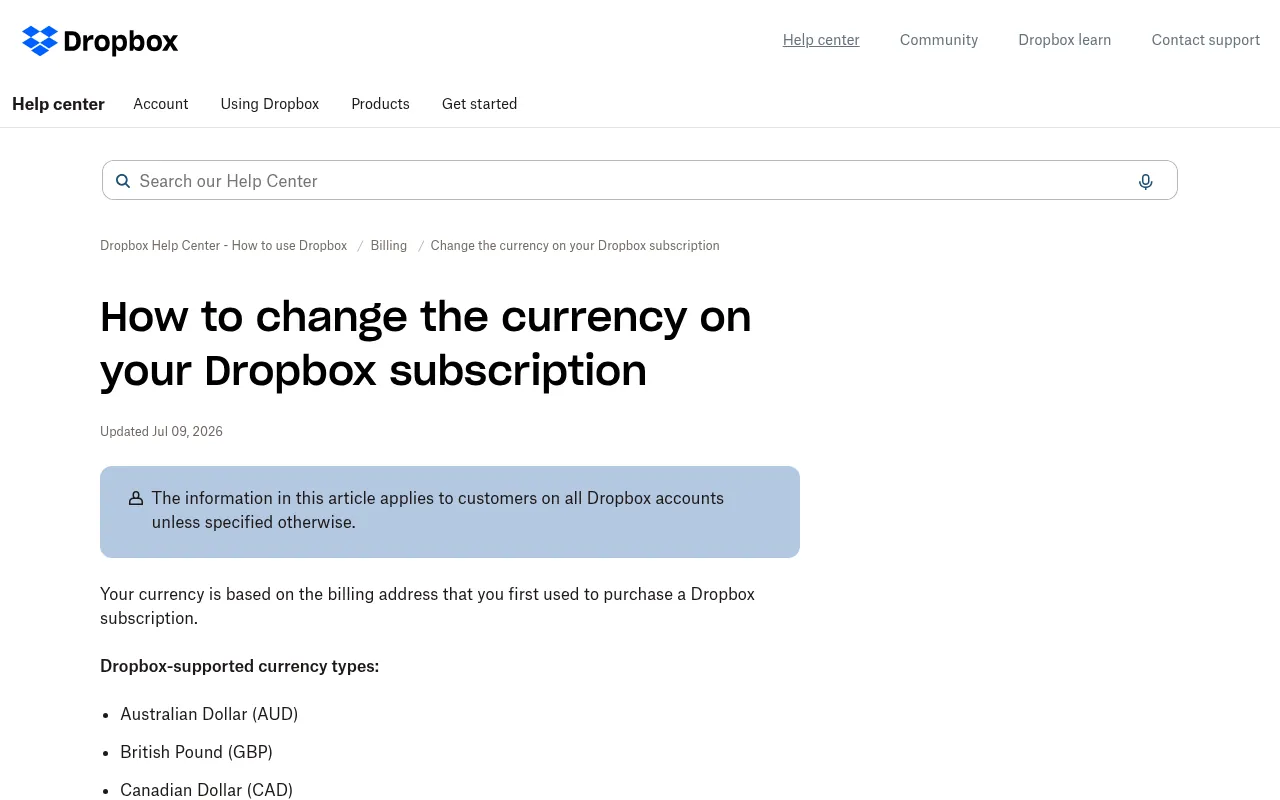
Dropbox’s tax help page lists India among the countries where it charges tax on subscriptions, and the tax shows up as a separate line on your invoice. You can see the estimated tax before buying: choose a plan, scroll to the bottom of the checkout page, select your country and enter your PIN code, and the order summary updates with the tax estimate. Businesses registered for GST can add their GST ID to the Dropbox account at any time.
In India, online services bought from foreign companies are generally taxed at 18% GST. Here is a rough estimate of what that does to the Dropbox price:
| Plan (billed yearly) | Before tax | With 18% GST (estimate) |
|---|---|---|
| Plus | about ₹11,361 a year | about ₹13,406 a year |
| Standard, per user | about ₹17,059 a year | about ₹20,129 a year |
| Advanced, per user | about ₹27,294 a year | about ₹32,207 a year |
These are my estimates at the FBIL exchange rate. Your real charge also depends on the exchange rate your card uses on the day and any foreign transaction fee from your bank.
How to Pay for Dropbox in India
Most Indian users pay Dropbox with an international-enabled credit or debit card or PayPal. A few practical points:
- Enable international transactions on your card before checkout. Many Indian cards block foreign online payments by default.
- UPI: in Dropbox’s community forum, a Dropbox team member said the UPI option can only be used for monthly subscriptions, not yearly ones. Treat this as a forum answer rather than an official policy page.
- App store billing: you can also subscribe through the Dropbox app using Google Play or the App Store, which bill in rupees.
- Teams: for business plans, centralized billing is part of the admin console on Standard and Advanced.
Dropbox Refund Policy
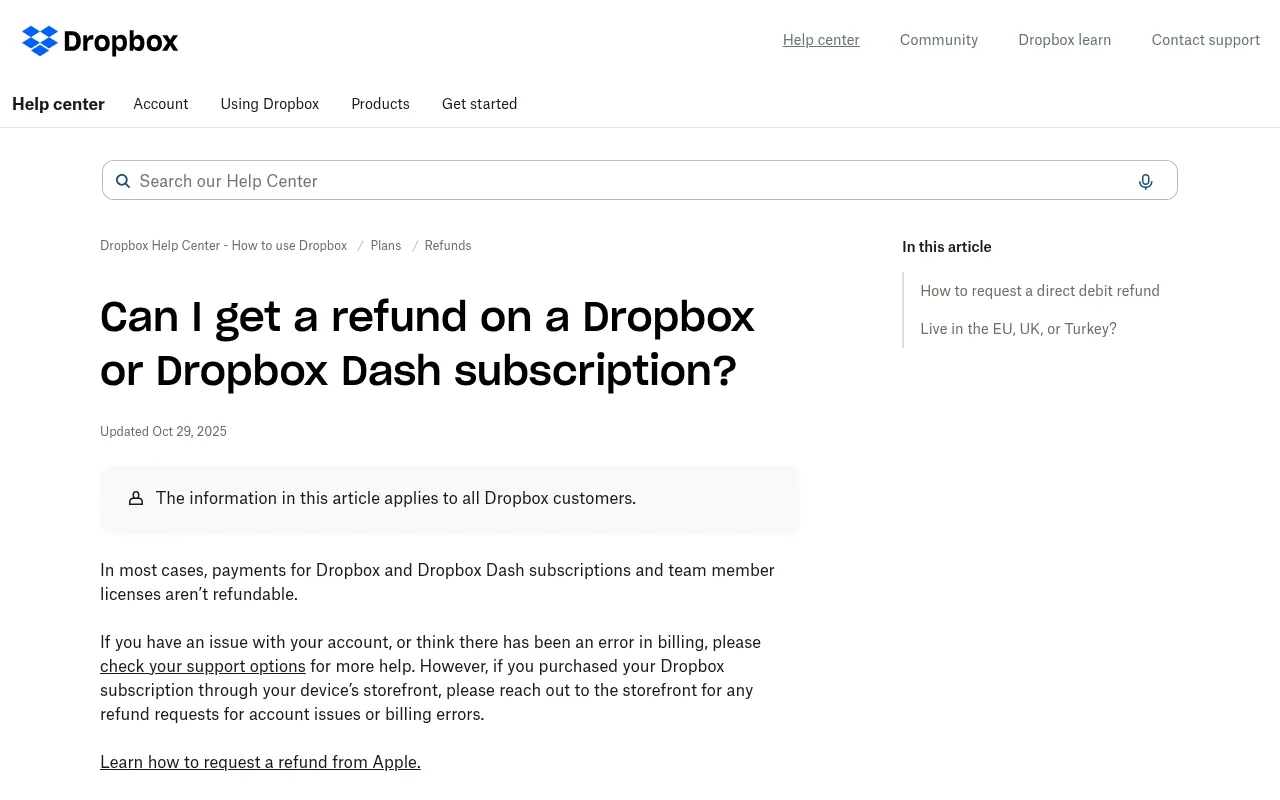
Dropbox’s Help Center is clear: in most cases, payments for Dropbox subscriptions and team member licenses are not refundable. If you live in the EU, the UK or Turkey, you can get a refund if you cancel Plus, Family, Professional or Essentials within 14 days of purchase, but that does not apply to India.
If you subscribed through Google Play or the App Store, refund requests go to that store, not to Dropbox. And if you ask your bank for a chargeback, Dropbox moves your account to the free Basic plan.
So in India, the safe approach is to start on monthly billing or a team trial, make sure Dropbox fits, and only then commit to a year.
Dropbox Discounts and Free Storage Tricks
Dropbox does not have a public coupon that discounts Plus for India. Here is what actually lowers your cost:
- Choose yearly billing: saves US$24 a year on Plus and US$36 to US$72 per user on team plans.
- Use the team trial: test Standard or Advanced before you pay.
- Share a Family plan: splitting 2 TB across up to 6 people is the cheapest way to get Dropbox for a household.
- Stay on Basic for sharing only: if you just need to send and receive files, the free plan with shared links may be enough.
Is Dropbox Worth It in India?
Pros
- Excellent sync and sharing: Dropbox’s desktop sync and shared links are the reason many professionals still use it.
- Large file transfers: up to 50 GB on Plus and 100 GB on team plans.
- Long file recovery on team plans: 180 days on Standard and 1 year on Advanced.
- PDF editing and e-signatures built in.
- Works on every device: Windows and Mac apps, iPhone and Android apps and the web, plus integrations with popular AI and work tools.
Cons
- No rupee pricing on dropbox.com: you pay in US dollars, plus tax and possible card fees.
- Small free plan: 2 GB on up to 3 devices is the least generous among the big names.
- Generally no refunds for Indian customers.
- More expensive than Indian-priced alternatives for plain storage, such as iCloud+, Google One or Microsoft 365.
- Family plan price is not shown on the main plans page.
My honest view: Dropbox is worth it for people and teams who move big files every day and share them with clients. For storing phone photos and documents, it is usually the expensive choice in India.
Dropbox vs Alternatives in India
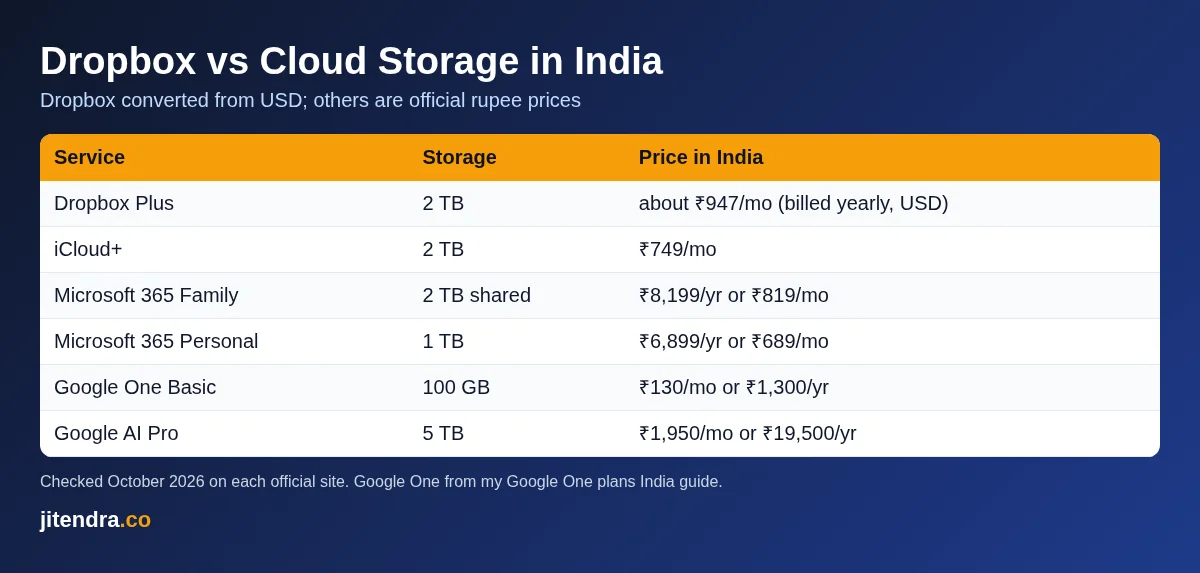
Here is how Dropbox compares with the cloud storage plans that bill in rupees in India. Dropbox prices are converted at ₹94.77 per US dollar before tax; the others are the official rupee prices shown on each company’s Indian pages.
| Service | Storage | Price in India | Notes |
|---|---|---|---|
| Dropbox Plus | 2 TB | about ₹947 a month (billed yearly, in USD) | 1 user |
| iCloud+ | 2 TB | ₹749 a month | Share with up to 5 family members |
| Microsoft 365 Family | 2 TB shared | ₹8,199 a year or ₹819 a month | 1 to 6 people, includes Office apps |
| Microsoft 365 Personal | 1 TB | ₹6,899 a year or ₹689 a month | Includes Word, Excel and PowerPoint |
| Google One Basic | 100 GB | ₹130 a month or ₹1,300 a year | Shared with up to 5 others |
| Google AI Pro | 5 TB | ₹1,950 a month or ₹19,500 a year | Includes Gemini AI features |
iCloud+
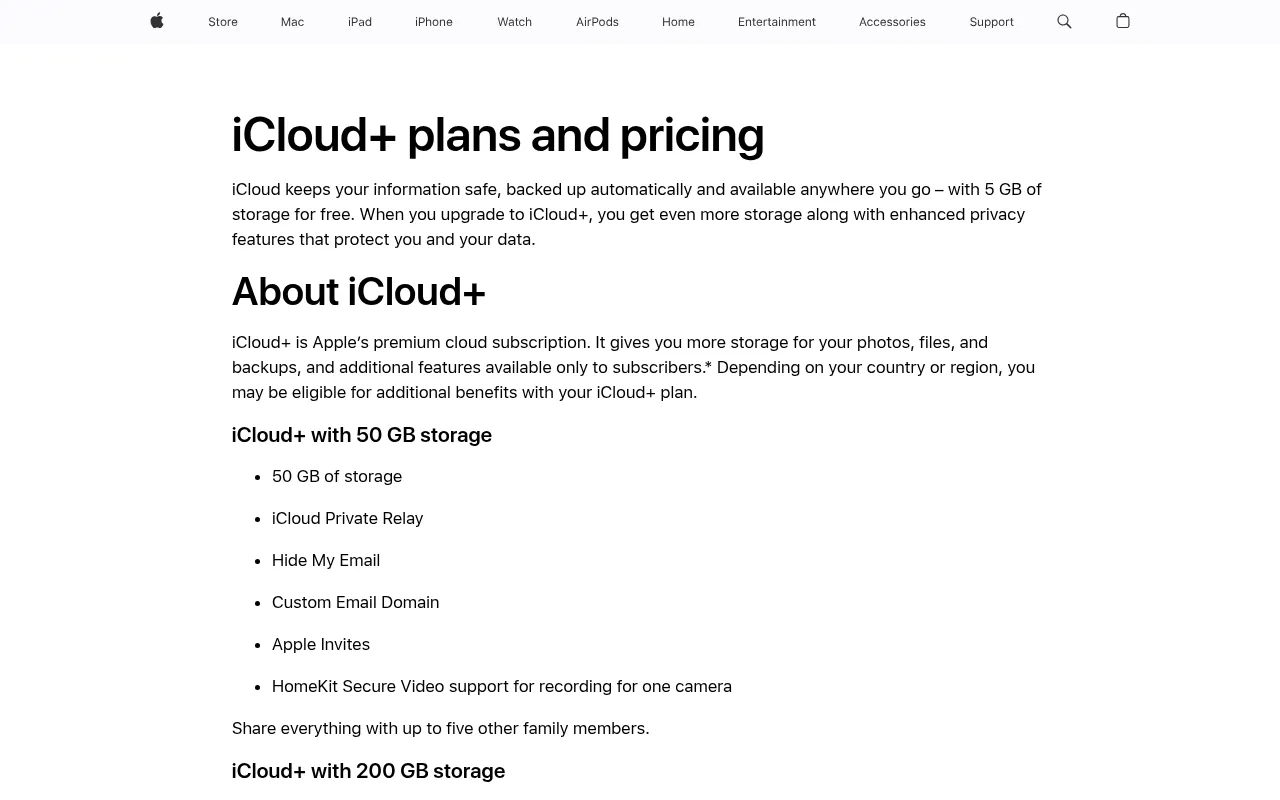
Apple’s official iCloud+ pricing page for India lists 50 GB for ₹75 a month, 200 GB for ₹219, 2 TB for ₹749, 6 TB for ₹2,999 and 12 TB for ₹5,900 a month, and you can share it with up to five other family members. If you use an iPhone, iCloud+ 2 TB is cheaper than Dropbox Plus and backs up your phone automatically.
Microsoft 365
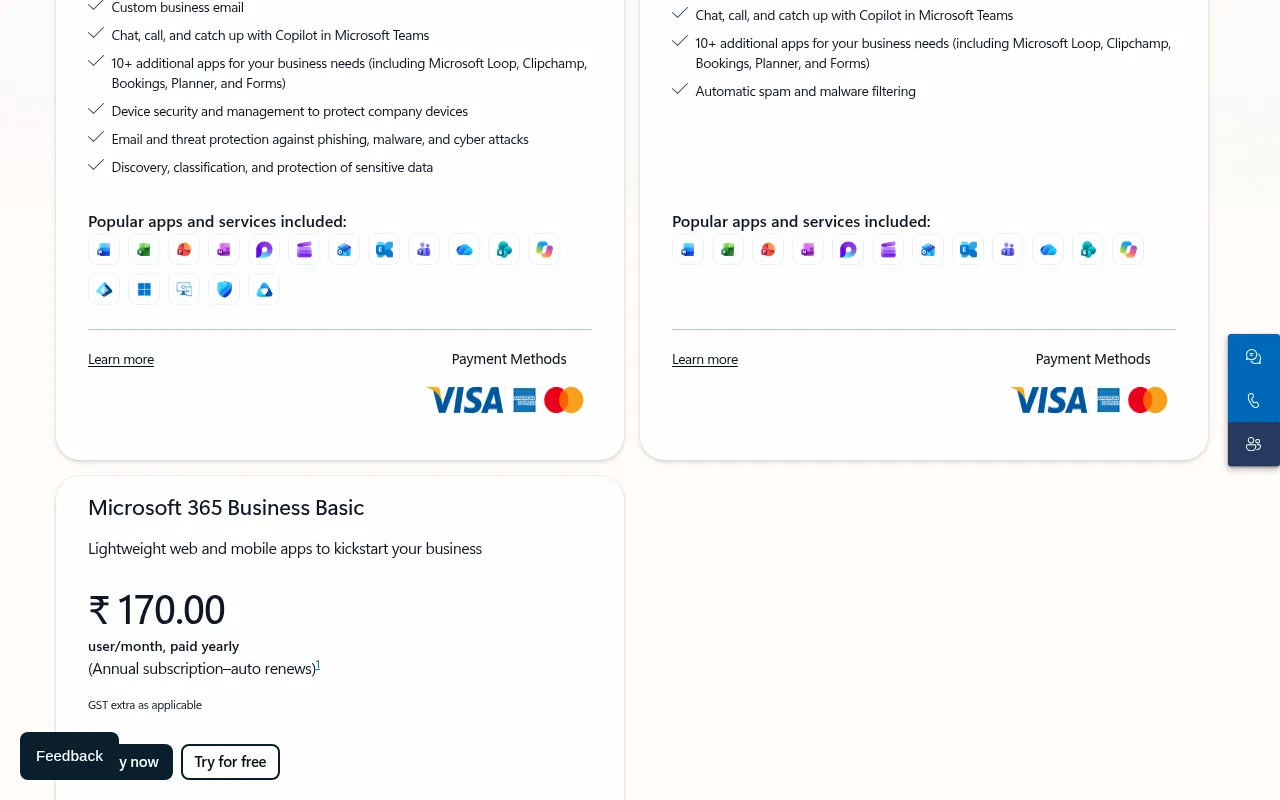
Microsoft 365 Personal costs ₹6,899 a year and includes 1 TB of OneDrive storage plus Word, Excel, PowerPoint and Outlook. Microsoft 365 Family costs ₹8,199 a year for 1 to 6 people with 2 TB of shared storage. If you need Office apps anyway, this is the best value storage in India. For businesses, Microsoft 365 Business Basic starts at ₹170 per user per month paid yearly, GST extra.
Google One
Google One has the most flexible plans in India, from 30 GB at ₹59 a month to 5 TB on Google AI Pro at ₹1,950 a month. I covered every plan, family sharing and Jio offers in my guide to Google One plans in India. Google One is the obvious choice if you live in Gmail, Google Photos and Android.
Zoho WorkDrive
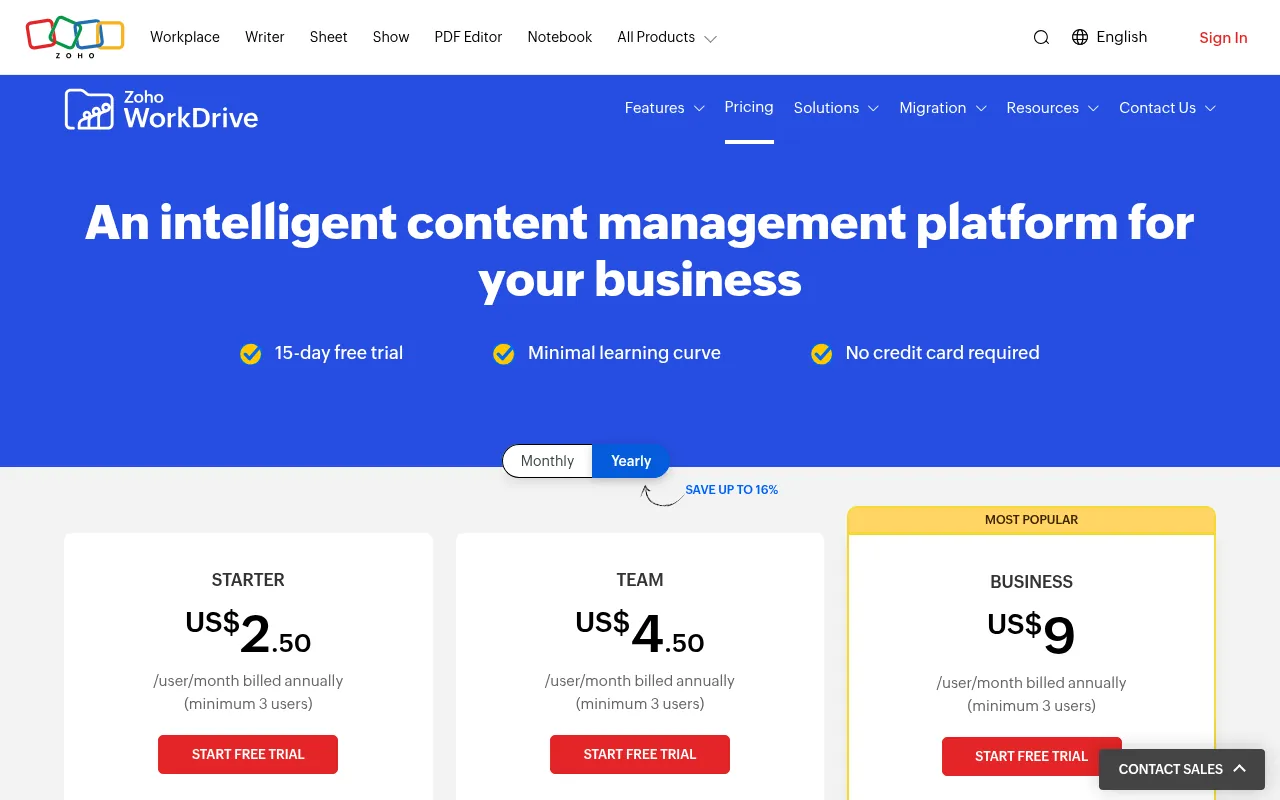
For Indian businesses that want team storage at a lower price, Zoho WorkDrive’s pricing page lists Starter at US$2.50 per user a month billed annually with 1 TB for the team, Team at US$4.50 with 3 TB, and Business at US$9 with 5 TB, each with a 3-user minimum and a 15-day free trial. These are the prices shown to me in US dollars; Zoho may show different local pricing in India.
Which Dropbox Plan Should You Choose?
| You are | My pick | Why |
|---|---|---|
| A student or casual user | Basic (free) or Google One | 2 GB is enough for sharing; Google gives 15 GB free |
| An iPhone user who needs space | iCloud+ 2 TB | Cheaper in rupees and backs up your phone |
| A video editor or photographer | Dropbox Plus, yearly | 2 TB and 50 GB transfers |
| A freelancer sharing client files | Dropbox Standard, 1 user | Password-protected links and 180-day recovery |
| A family | Dropbox Family or Microsoft 365 Family | Shared 2 TB with separate private accounts |
| A team of 3 or more | Standard, or Advanced for security needs | Team folders, admin console, SSO on Advanced |
If you are unsure, start with Basic, use a team trial or one month of Plus, and switch to yearly billing once Dropbox becomes part of your routine.
How to Buy a Dropbox Plan in India (Step by Step)
- Go to the Dropbox plans page and choose Billed yearly or Billed monthly at the top.
- Click Buy now under Plus, or Try for free under Standard or Advanced.
- Sign in or create a Dropbox account with your email or Google account.
- At checkout, select India as your country and enter your PIN code to see the tax estimate.
- Pay with an international-enabled card or PayPal, or use the UPI option if it appears for monthly billing.
- Install the Dropbox desktop and mobile apps and turn on camera uploads or computer backup if you need them.
Before you pay for a year, also check that your data is safe while it moves to the cloud. If you often use public Wi-Fi, read my guide to the best VPN in India.
Why Trust Me

I am Jitendra Vaswani, an SEO consultant with 12 years in search. I founded Digiexe and AffiliateBooster, and I am an author and international speaker.
Running content and SEO teams means shared files are part of my daily work, so I care about what cloud storage really costs. Every Dropbox price, limit and policy in this guide comes from Dropbox’s official plans pages and Help Center, checked on October 21, 2026, and the alternatives’ prices come from Apple, Microsoft, Google and Zoho’s official pages. Rupee figures for Dropbox are conversions at the FBIL reference rate, and I have flagged what I could not verify. I have not invented speed tests or scores.
Personal Operator Notes on Dropbox in India
I have used Dropbox on and off across DigiExe delivery years because many overseas clients already live there. That client gravity matters more than a feature grid. When an American brand shares a folder, arguing for a different cloud slows the project. Personalized consulting means meeting clients where their files already are.
INR, GST and Receipt Hygiene
Dropbox list prices are typically shown in USD. Indian teams should:
- Screenshot the checkout currency before paying
- Save GST invoices if your CA needs them
- Compare yearly versus monthly with real seat counts
- Watch for team seat creep after freelancers leave
I do not freeze rupee conversions in stone inside this article because FX moves. Use the official pricing page on the day you buy.
Selective Sync Discipline
Design teams break Dropbox when they sync every archive to every laptop. Selective sync and smart sync style features exist to prevent that. Train juniors on day one. Disk-full emergencies are not a badge of honor.
Dropbox Versus Drive for BloggersIdeas Ops
Editorial planning often sits in Google Docs because commenting is easy. Binary design assets sometimes sit in Dropbox. Mixing tools is normal. What is not normal is having no written map of where masters live. Write the map.
Family Plan Reality Check
Family plans can be great for households and terrible for client confidentiality. Do not drop client folders into a family plan shared with relatives. DigiExe rule: client data stays on work accounts.
Extended Dropbox FAQ From Indian Readers
Can I pay Dropbox in INR with UPI?
Payment methods vary by account and processor. Check checkout. Do not trust a screenshot from 2022.
Is Dropbox Basic enough?
Free tiers are for light personal use. Professional delivery needs paid space and clearer admin.
Dropbox refunds?
Read the official refund help page for your region and plan. Policies are not identical forever.
Business versus Plus?
If more than one person needs predictable collaboration, evaluate business tiers with admin needs in mind. Solo creators can often stay on individual plans.
Dropbox for Affiliate and SEO Teams Like Mine
Affiliate screenshots, contract PDFs, and creative source files pile up. Without folder taxonomy, Plus storage fills with junk. My taxonomy:
/clients/{name}/contracts/clients/{name}/creatives/source/clients/{name}/creatives/exports/internal/podcast/internal/talks
Personalized structure beats buying more TB you will not search.
Desktop App Versus Browser Only
Heavy designers need the desktop app. Light writers can live in browser. Forcing everyone into the same pattern creates fake problems.
Version History Expectations
Version history windows differ by plan. If you need long history for legal drafts, read the current plan comparison carefully. Do not assume free-tier history will save you after a month.
Third-Party Integrations
Slack and Zoom integrations sound great until notifications become noise. Enable integrations intentionally.
Dropbox Security Checklist I Give Founders
- Unique password + password manager
- Two-factor authentication
- Remove ex-freelancer access the same day
- Separate personal and work teams
- Periodic shared-link audit
Cost Scenario Stories Without Fake Benchmarks
Scenario A: solo YouTuber storing raw takes – calculate monthly raw GB before choosing TB tiers.
Scenario B: five-person content team – count seats and admin needs, not just storage.
Scenario C: agency with overseas clients – Dropbox may win on familiarity even if Drive is cheaper.
Final Dropbox Buying Rule
Pay when collaboration pain is real. Cancel when folders are a graveyard. Storage subscriptions love neglect.
Dropbox India Checkout Walkthrough Mentality
I open the official plans page, switch currency if the UI allows, note seat count, and only then compare to Google One and a hard drive budget. If a salesperson pitches Dropbox Business, I ask about minimum seats, admin SSO needs, and exit costs. Personalized procurement beats brochure shopping.
Link Sharing Mistakes I Still See
- Forever links to confidential decks
- Links sitting in WhatsApp groups after projects end
- Same link reused across two clients
Audit monthly. It takes fifteen minutes and prevents ugly emails.
Dropbox Paper, Transfer and Adjacent Tools
Dropbox evolved beyond a blue box icon. Transfer-style large send tools, paper docs, and replay features appear and disappear in packaging. Before you buy because of a feature marketing slide, ask whether your team will use it weekly. DigiExe buys for weekly use, not for museum features.
Replay and Creative Review Mentality
Creative review tools help when clients comment on video frames. They hurt when clients never login and still WhatsApp you. Choose collaboration surfaces clients will actually open.
India Office Bandwidth
Syncing multi-gig footage from a small office connection during work hours tanks Zoom calls. Schedule heavy sync overnight. Personalized ops includes network empathy.
Contract Language for Clients
Add a line: “Working files may be shared via Dropbox or Google Drive at our discretion. Final deliverables are also provided as downloads. Retention of working files after project close is N days unless archived by written request.” Clarity prevents “please find that file from 2022” nightmares.
Dropbox for Podcast Ops
Inside A Hustler’s Brain production may park large audio in whatever vault the editor prefers. The rule is one canonical folder per episode code. Naming beats brand of cloud.
Hiring Freelancers Securely
Create a folder per freelancer. Do not invite them to the entire company Dropbox. Remove them on the last invoice day. This is basic and still skipped.
SEO Site Migration Archives
When we migrate WordPress sites, we keep database dumps and wp-content archives in locked folders with dates. Cloud storage without dates becomes archaeology.
Extra FAQ
Does Dropbox work offline?
Desktop clients cache; browser needs net. Test before a flight.
Can I use personal Plus for a tiny LLC?
Often people do. Still separate personal photos from client folders.
What about Dropbox Passwords or adjacent upsells?
Evaluate separately. Bundle upsells are not mandatory.
Reminder
Buy Dropbox for collaboration pain you can describe in one sentence. If you cannot describe the pain, do not pay yearly.
DigiExe Folder Hygiene That Saves Hours
Dropbox only helps if naming is boring and consistent. For DigiExe client work I push teams toward:
- Client code at the front of the folder name
- Year-month in deliverable filenames
- A
_finalsuffix only on approved exports - A
_workingfolder that juniors can mess with - A
_legalfolder for contracts that is not shared broadly
Personalized ops beat fancy Dropbox features you never open.
BloggersIdeas Media Staging
Article screenshots and featured images often stage in cloud storage before WordPress upload. Dropbox shared links are fine for contractor handoff when permissions are view-only. I still prefer final media living in WordPress or a controlled Drive once published, so a revoked Dropbox seat does not break an old draft.
Dropbox Smart Sync Mentality for Laptops
Laptops fill up. Selective sync and online-only files matter more in India when editors carry 512 GB machines. Teach the team the difference between “available offline” and “cloud only” before someone boards a flight assuming the campaign folder is local.
When I Pick Google Drive Instead
If the client’s whole company already lives in Google Workspace, forcing Dropbox creates dual systems. DigiExe will match the client’s system unless Dropbox is clearly better for large creative binaries. Tool religion loses to handoff speed.
Extra India Payment Notes
Screenshot the USD price and the bank INR debit the day you buy. Forex markup varies by card. GST line items may appear differently on invoice versus statement. Keep both for finance.
Dropbox for Podcast Guest Files
Inside A Hustler’s Brain guests sometimes send large B-roll. A time-limited shared folder beats WhatsApp compression. Set an expiry mindset even if the product link does not auto-expire: delete when the episode is published.
Buyer Checklist Before You Upgrade Storage
- Who owns the admin seat if a freelancer leaves?
- Is version history long enough for your revision cycles?
- Do you need DocSend-style link controls or is a simple share enough?
- Will Plus cover you for 12 months or will you outgrow it in 90 days?
Answer those in writing. Then buy.
Dropbox Business Seat Math for Small Indian Teams
If three people need shared project folders with proper admin control, compare three Plus seats versus one Business plan with team features. Do the INR math with forex buffer. DigiExe prefers fewer admin surfaces. A single team plan can be cheaper than scattered personal Plus accounts that nobody offboards.
Offboarding Checklist
When a contractor leaves:
- Remove device sessions
- Transfer folder ownership
- Rotate shared links
- Export any unique local-only notes
- Confirm WordPress and ad accounts were never only inside their Dropbox
Personalized security is paperwork plus clicks.
FAQs
What is the Dropbox price in India?
Dropbox Plus costs US$9.99 a month billed yearly (about ₹947 a month or ₹11,361 a year) or US$11.99 billed monthly (about ₹1,136). Dropbox Standard costs US$15 per user a month billed yearly and Advanced costs US$24 per user a month billed yearly. Tax is added at checkout.
Is Dropbox free in India?
Yes. Dropbox Basic is free with 2 GB of storage on up to 3 devices, with 30-day file recovery.
Does Dropbox charge in rupees?
Not on dropbox.com. Dropbox supports AUD, GBP, CAD, EUR, JPY and USD, so Indian billing addresses are charged in US dollars. Subscribing through Google Play or the App Store lets you pay in local currency.
How much is Dropbox 2 TB in India?
Dropbox Plus with 2 TB costs US$119.88 a year (about ₹11,361 before tax) or US$11.99 a month (about ₹1,136) on monthly billing.
Can I pay for Dropbox with UPI?
A Dropbox team member in its community forum said UPI can only be used for monthly subscriptions. For yearly plans, use a card or PayPal.
Does Dropbox give refunds in India?
In most cases, Dropbox payments are not refundable. The 14-day refund window applies only to customers in the EU, UK and Turkey.
Is Dropbox cheaper than Google One in India?
No. For plain storage, Google One, iCloud+ and Microsoft 365 all charge in rupees and cost less per GB than Dropbox Plus. Dropbox is the better pick when you need its sync, large transfers and client sharing tools.
Which Dropbox plan is best for small businesses in India?
Dropbox Standard suits most small teams, with 3 TB to start, 180-day recovery, team folders and an admin console. Choose Advanced if you need SSO, end-to-end encryption and tiered admin roles.
Conclusion
Dropbox pricing in India in 2026 starts at free for 2 GB, then US$9.99 a month billed yearly for 2 TB on Plus (about ₹11,361 a year before tax), US$15 per user on Standard and US$24 per user on Advanced. All of it is billed in US dollars, tax is added at checkout, and refunds are rare, so test on monthly billing or a trial before you commit to a year.
For heavy file sharing and client work, Dropbox is still one of the smoothest tools around. For storing photos and documents, rupee-priced options like iCloud+, Microsoft 365 and Google One cost less, so compare them before you pay. For more tools I use and recommend, see my list of the best free AI apps.
Sources
Dropbox plan names, prices, storage, features, currencies, tax, refund policy and Family plan rules were taken from Dropbox’s plans page (yearly and monthly billing), business pricing page, Basic page and Help Center articles on supported currencies, tax, refunds and the Family plan on October 21, 2026. The UPI note comes from a Dropbox staff answer in the Dropbox Community forum. Alternative prices come from Apple Support (iCloud+ plans and pricing, India), Microsoft India’s Microsoft 365 pages and Zoho WorkDrive’s pricing page on the same day, and Google One prices from my Google One plans India guide. Rupee conversions use the FBIL/RBI reference rate of ₹94.7691 per US dollar for October 19, 2026.

Jitendra Vaswani is a globally recognized expert in SEO and AI-driven digital marketing. He has spoken at leading international events and is the founder of Digiexe, a results-driven digital marketing agency; Venuelabs, a platform that helps brands amplify their voice with expert PR and marketing solutions; and AffiliateBooster, an affiliate marketing news site. With over a decade of hands-on experience, Jitendra has empowered countless businesses to thrive online. His bestselling book, Inside A Hustler’s Brain: In Pursuit of Financial Freedom, has sold more than 20,000 copies worldwide, reflecting his influence and dedication to helping digital marketers achieve success. Follow Jitendra on Instagram, X/Twitter, Facebook, and LinkedIn.